
Optimizing a static website for search engines really comes down to playing to its strengths. You're already starting with a foundation built on speed, security, and simplicity. By focusing on smart on-page and technical SEO, you can translate these built-in advantages into better rankings and a fantastic user experience that gets your content seen.
Why Static Websites Have a Built-in SEO Advantage

It’s a common misconception that just by using a static site generator, you've automatically won the SEO game. While you get a serious head start, that simplicity doesn't give you a free pass on the fundamentals. Think of it like being handed the keys to a high-performance race car—it has the raw potential to win, but it still needs a skilled driver who knows the track.
The real power of a static architecture is how perfectly it aligns with what search engines like Google prioritize: an exceptional user experience. It's not about cheating the system; it's about delivering what users want, faster.
The Unbeatable Edge of Speed
The most obvious and impactful benefit is pure, blazing-fast loading speed. Dynamic sites have to hit a database and build a page from scratch for every single visitor. Static sites skip all that. They serve pre-built HTML files directly, making the experience feel almost instantaneous.
Speed isn't just a nice perk; it's a core ranking signal. People have no patience for slow websites. A fast site keeps them engaged, which lowers your bounce rate and tells Google that your content is valuable. In a world where every millisecond matters, a static site's performance is its greatest SEO weapon.
Rock-Solid Security and Reliability
Security is another huge, often-overlooked advantage. With no database to hack and no complex server-side plugins full of potential holes, static websites have a tiny attack surface. They are just inherently safer.
A secure site is a trustworthy site in Google's eyes. Search engines actively avoid sending users to websites that could be a security risk, giving a well-built static site another clear edge.
This reliability translates to fantastic uptime, too. When your site is served from a global Content Delivery Network (CDN), it's always on and always fast, no matter where your visitors are. Platforms like Hostmora bake this in, automatically pushing your files to servers around the world. For a deeper dive into these modern deployment methods, you can explore guides on using services like Firebase for website hosting.
Simplified Architecture for Flawless Crawling
For a search engine bot, a static site is a dream come true. The code is clean, the HTML structure is straightforward, and the URLs are predictable. There are no weird database queries or session IDs to trip up the crawler.
This simplicity means Google can easily find, understand, and index all your important pages. When you pair this clean structure with a well-organized XML sitemap and a proper robots.txt file, you’re creating the perfect conditions for search engine success.
The potential impact here is massive. With organic search driving nearly 47% of all website traffic, you can't afford to get this wrong. Static sites are perfectly poised to capture this audience because they nail the performance metrics that matter most. We know that 53% of mobile users will bounce if a page takes longer than 3 seconds to load, and static sites easily beat that threshold.
Mastering Your On-Page SEO Fundamentals
With a static website, you’re in the driver's seat. On-page SEO isn't about wrestling with a clunky CMS; it's about working directly with clean HTML. This gives you precise, unfiltered control over the signals you send to search engines.
Think of these fundamentals as your primary toolkit for attracting the right audience. It's amazing how a simple tweak can be the difference between getting buried on page five and landing a top spot. You're essentially labeling the aisles in a grocery store—without clear signs, both shoppers and search engine crawlers will get completely lost.
Crafting Titles and Descriptions That Actually Work
Your title tag and meta description are your handshake with the world on a search results page. They are often the first—and sometimes only—impression a potential visitor gets of your site.
So many people make the mistake of using a generic title like "Portfolio" or "Services." That tells Google and your potential visitors absolutely nothing. You need to be descriptive and strategic.
- Weak Title:
Portfolio - Strong Title:
Jane Doe | San Francisco Product Designer & UX Strategist
See the difference? The second one immediately communicates location, specialty, and value. The same logic applies to your meta descriptions. While they don't directly impact rankings, a compelling description can drastically improve your click-through rates. It’s your 160-character elevator pitch.
Structuring Content with Semantic HTML
Beyond the obvious tags, the very structure of your HTML document is a huge SEO signal. Using semantic HTML tags like <header>, <nav>, <main>, and <footer> gives crawlers a logical roadmap of your page.
Your heading tags (<h1>, <h2>, <h3>, etc.) are especially critical. They create a clear hierarchy for your content, which makes it far easier for both search engines and human readers to digest what the page is about.
Every single page should have exactly one
<h1>tag—this is your main headline. Use<h2>and<h3>tags to organize the subtopics underneath it. Whatever you do, don't use headings just to make text bigger, and never skip levels (like jumping from an<h2>to an<h4>).
Getting this structure right is foundational. For a deeper dive into proving your site's credibility, which is essential, check out these strategies for engineering E-E-A-T into every page.
Optimizing Images for Speed and Context
Even the fastest static site can be dragged down by heavy images. Before you upload anything, run your images through a tool like TinyPNG to shrink the file size without killing the quality. Also, get into the habit of using descriptive filenames—think static-website-seo-checklist.jpg instead of IMG_1234.jpg.
Most importantly, never, ever skip the alt text. The alt attribute is your chance to describe an image for screen readers and search engines. It’s a massive win for accessibility and helps your images show up in Google Images search.
- Bad Alt Text:
alt="graph" - Good Alt Text:
alt="Bar chart showing organic traffic growth increasing by 75% over six months"
Building Authority with Internal Links
Internal linking is just what it sounds like: linking from one page on your own website to another. This is a surprisingly powerful strategy. It spreads "link equity" (think of it as authority or SEO juice) throughout your site, guides users to other relevant content, and helps search engines discover all your pages.
For example, if you mention a related topic in a blog post, you could link to our detailed guide on setting up HTML URL redirects.
A solid internal linking structure points more links to your most important pages, signaling their significance to Google. This simple tactic keeps people on your site longer and makes your entire site more crawlable.
The impact of getting these on-page details right is staggering. The first page of Google captures over 98% of all clicks, with the top three results snagging 61.8% of that traffic. The good news? On-page SEO on static sites can produce massive wins. One analysis found that just updating title tags boosted organic clicks by an incredible 437% across more than 135 pages. It's a powerful reminder to never neglect the fundamentals.
Master Technical SEO with Blazing Speed and Flawless Crawlability
When it comes to technical SEO, static websites aren't just in the game—they're built to win. By ditching complex server-side processing, you automatically gain an edge in speed and crawlability, two of the most critical pillars for ranking well. This isn’t about wrestling with server configurations; it’s about playing to the strengths of your site's clean, efficient architecture.
Harnessing Raw Speed and Core Web Vitals
Let's start with your most powerful weapon: raw speed. For search engines today, a fast-loading page isn't just a nice-to-have; it’s the price of entry for a good user experience. Static sites are brilliant at this, serving pre-built HTML files that load in the blink of an eye.
This performance directly fuels better Core Web Vitals, the specific metrics Google uses to judge a page's real-world user experience. A static site’s inherent simplicity helps you sidestep the common pitfalls—like slow server response times or heavy JavaScript—that tank these scores.
Here's a quick rundown of the Core Web Vitals and how your static site gives you a head start on optimizing them.
Core Web Vitals Checklist for Static Sites
| Metric (Core Web Vital) | What It Measures | How to Optimize on a Static Site |
|---|---|---|
| Largest Contentful Paint (LCP) | The time it takes for the largest image or text block to become visible. | Optimize images (use WebP, compress them), lazy-load below-the-fold assets, and use a CDN to serve files from a location close to the user. |
| First Input Delay (FID) / Interaction to Next Paint (INP) | How quickly the browser responds to a user's first interaction (like a click). INP is the successor. | Minimize and defer non-critical JavaScript. Since static sites have less JS to begin with, you're already ahead. |
| Cumulative Layout Shift (CLS) | The visual stability of a page. Do elements jump around as it loads? | Always specify dimensions (width and height) for images and video elements. Preload fonts to prevent layout shifts when they load. |
Nailing these metrics is far more straightforward with a static setup, turning a potential SEO headache into a competitive advantage.
Guiding Search Bots with Sitemaps and Robots.txt
Even the fastest site on the web is useless if search engines can't find its pages. That's where a clean XML sitemap and a precise robots.txt file come in. Think of them as a map and a set of rules for search engine crawlers.
Your XML sitemap is simply a list of every important URL you want indexed. If you're using a static site generator like Hugo or Next.js, it can probably create one for you automatically. If not, plenty of online tools can get it done in seconds. Just make sure it stays current as you add or remove content.
The robots.txt file tells search bots which areas of your site to stay out of. For most static sites, a simple file that allows access to everything while pointing to your sitemap is all you need.
Pro Tip: Don't get fancy with your
robots.txtfile. I've seen complex rules accidentally block essential CSS or JavaScript files, which prevents Google from rendering the page correctly and tanks rankings. Simplicity is your best friend here.
This flowchart gives you a solid framework for thinking through on-page optimizations, which goes hand-in-hand with your technical SEO efforts.
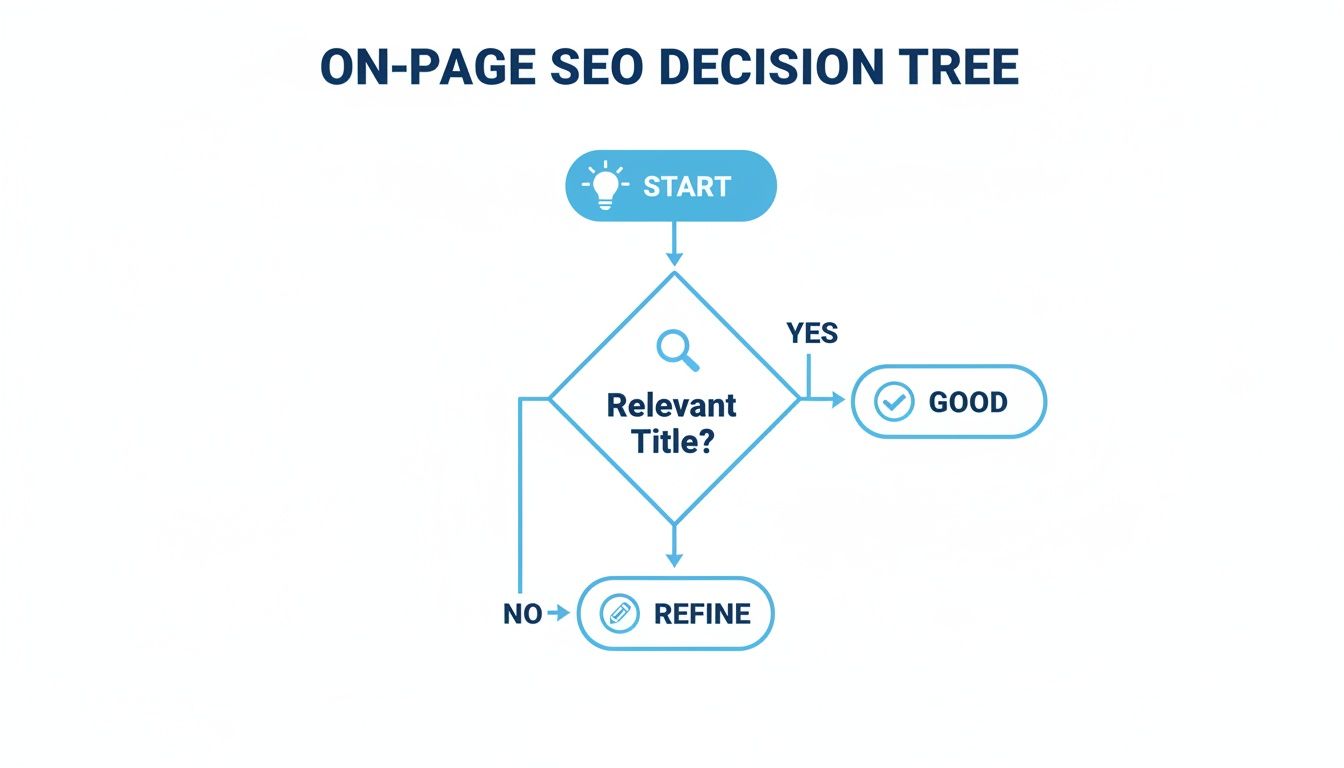
As the diagram shows, a methodical approach to refining your site's core elements is key to ensuring they meet search engine expectations.
Avoiding Content Confusion with Canonicals and Redirects
Duplicate content is a classic SEO problem that can sneak up on anyone, even on a static site. It often happens when the same page is reachable via multiple URLs—think www vs. non-www, or with and without a trailing slash. This can split your ranking signals and confuse search engines.
The fix is the canonical tag. It’s a simple line of HTML (<link rel="canonical" href="https://yourdomain.com/preferred-url">) that points to the "official" version of the page, telling search engines to consolidate all authority there.
Likewise, 301 redirects are your go-to for permanently moving a page. If you change a URL, a 301 redirect seamlessly sends users and search bots to the new location, carrying over the original page's ranking power. Most modern static hosting platforms let you set up these rules easily. You can often find this kind of feature even with services that offer free static site hosting.
The need for speed can't be overstated. Research shows 53% of mobile visitors will bounce if a page takes longer than three seconds to load. By serving static files directly from a CDN, you eliminate the server-side bottlenecks that slow other sites down. Hostmora's platform, for instance, pushes your files across 35+ edge nodes to ensure near-instant delivery anywhere in the world.
To really dig into how search engines see your site, you can use advanced AI crawl checker tools for a deeper analysis. By getting these technical details right, you transform your static site’s natural advantages into a formidable SEO powerhouse.
Using Structured Data to Stand Out in Search
If on-page SEO tells search engines what your site is about, structured data gives them the context to truly understand it. Think of it as a translator for search bots, turning your regular content into a language they can process with perfect clarity. This is your ticket to earning rich snippets—those eye-catching search results that feature star ratings, event details, or prices.

This simple addition transforms a standard blue link into a rich, informative listing that practically begs to be clicked. For static websites, implementing this is incredibly straightforward because you have direct access to the HTML. You aren't wrestling with a plugin; you're just adding a block of code.
So, What Exactly Is Structured Data?
Structured data is just a standardized format for providing extra information about a page and classifying its content. The most common vocabulary everyone agrees on is Schema.org, a collaborative effort by Google, Bing, and other search engines. You add this information to your page using a script format called JSON-LD.
This script sits quietly in the <head> or <body> of your HTML, invisible to your visitors but crystal clear to search crawlers. It doesn't change how your page looks one bit, but it completely changes how search engines see it.
This isn't just a "nice-to-have." Rich snippets can improve click-through rates by as much as 30%. When you're competing for attention in a crowded search results page, that kind of boost is a game-changer for any static website.
By explicitly defining your content, you remove all the guesswork. You’re no longer just hoping Google figures out your page is about a local business; you are telling it directly with LocalBusiness schema. This is a crucial element of modern SEO for static websites.
Practical Examples for Common Static Sites
The real beauty of structured data is its versatility. No matter what your static site is for, there’s almost certainly a schema type that fits. Here are a few real-world examples you can adapt and paste directly into your projects.
For a Freelancer Portfolio:
Use the Person schema to highlight your skills, professional identity, and expertise. This helps search engines understand who you are and what you do, connecting you with relevant searches.
For a Small Business or Restaurant:
The LocalBusiness schema is perfect for getting your hours, address, and phone number to show up directly in search results. It makes it dead simple for local customers to find and contact you.
What About JavaScript-Heavy Static Sites?
Things get a little trickier if your static site relies heavily on JavaScript, like a Single Page Application (SPA) built with React or Vue. If search bots can't properly render your content, they'll never see your structured data.
This is where your rendering strategy becomes critical.
- Static Site Generation (SSG): This is the gold standard. Frameworks like Next.js or Nuxt.js pre-render your pages into static HTML files at build time. Search engines get fully-formed, crawlable pages with all the structured data already baked right in. It’s perfect.
- Server-Side Rendering (SSR): With SSR, the server renders the initial HTML for each request. This also works great, ensuring crawlers receive a complete page.
- Dynamic Rendering: This is more of a workaround where you serve a pre-rendered version of your page specifically to search bots, while human users get the client-side JavaScript experience.
For most static projects, SSG provides the best of both worlds: incredible performance for users and flawless indexability for search engines. It ensures all your hard work on structured data actually pays off.
How to Monitor and Measure Your SEO Success
You've built and launched your optimized static site. Great. But if you just set it and forget it, you're flying blind. You have no idea what’s working, what's falling flat, and where your next big win is hiding. Measuring your SEO success isn't about chasing vanity metrics; it's about making smart, data-driven decisions that grow your traffic over time.
The good news? The two most powerful tools for the job are completely free. Getting Google Search Console and Google Analytics set up isn't optional—it's the first real step in any serious SEO effort.
Setting Up Your Essential Toolkit
Think of Google Search Console (GSC) as your direct line of communication with Google. It's where Google tells you exactly how it sees your website. You'll find out which keywords are bringing people to your door and, more importantly, if there are any technical glitches (like crawl errors) that need fixing ASAP.
Google Analytics (GA4), on the other hand, shows you what people do after they arrive. It’s all about user behavior—how they navigate your site, which pages hold their attention, and whether they complete key actions.
When you connect these two, you get the full story. You can trace the entire user journey, from the moment they type a query into Google to the final conversion on your site.
Key Metrics to Actually Watch
Once you're set up, it’s easy to get overwhelmed by all the charts and numbers. To avoid analysis paralysis, zoom in on the metrics that truly matter for your static site's SEO health.
- Impressions: This is how many times your site appeared in search results. Think of it as your top-level visibility.
- Clicks: The number of people who actually clicked through to your site from the search results. This tells you if your headlines and descriptions are doing their job.
- Click-Through Rate (CTR): Simply the percentage of impressions that turned into a click. A consistently low CTR is a huge red flag that your page titles and meta descriptions aren't compelling enough.
- Average Position: This tracks your average ranking for various keywords. Watching this trend up or down over time is the clearest indicator of your progress.
Your command center for all this information is the Performance report in Google Search Console. It's the place to see which specific queries and pages are your top performers, helping you double down on what works and spot new keyword opportunities.
The dashboard gives you a powerful overview of your site's performance, right at your fingertips.
This is where you'll start to uncover insights that directly influence your strategy, helping you analyze performance and fix any indexing issues that are holding you back.
Turning Data into Actionable Insights
Data is useless until you ask questions. Look for patterns. Is a certain page getting a ton of impressions but a terrible CTR? That's your cue to A/B test some new, more enticing title tags and meta descriptions.
Maybe you're stuck at the bottom of page one for a really valuable keyword. Time to revisit that page and build more internal links pointing to it to give it an authority boost. Or perhaps Google Analytics shows a high bounce rate on a key landing page. That's a clear signal to investigate the page's content or user experience—is it meeting the searcher's needs?
This continuous loop of measuring, interpreting, and acting is what separates professional SEO from simple guesswork.
Your Static Website SEO Checklist
To tie everything together, here’s a scannable checklist that sums up the key actions from this guide. Keep it handy and run through it periodically to keep your site’s SEO in top shape.
- On-Page SEO Fundamentals
- Write unique, keyword-focused title tags for every single page.
- Craft compelling meta descriptions that act as a mini-ad for your content.
- Maintain a logical heading structure (one
<h1>per page, followed by<h2>s, etc.). - Optimize images with compression and descriptive
alttext. - Build a smart internal linking structure to guide users and search engines.
- Technical SEO and Performance
- Make sure your site is blazing fast and passes the Core Web Vitals assessment.
- Generate an accurate XML sitemap and submit it to Google.
- Use a clean
robots.txtfile to control crawler access. - Implement canonical tags to resolve any potential duplicate content issues.
- Use 301 redirects for any pages that have moved permanently.
- Advanced Optimization and Monitoring
- Add structured data (Schema.org) to help your pages earn rich snippets in search results.
- For JavaScript-heavy sites, rely on pre-rendering or an SSG to ensure crawlability.
- Regularly check your performance in Google Search Console and Analytics.
- Analyze keyword rankings, CTR, and user behavior to find your next growth opportunity.
By consistently keeping an eye on your performance and sticking to these best practices, you can make sure your static site fully capitalizes on its natural speed and security advantages to climb—and hold—the top spots in search rankings.
Your Static Site SEO Questions, Answered
When you start digging into SEO for static sites, a few common questions always seem to pop up. It makes sense—you're often dealing with different technologies and workflows compared to traditional systems. Let's clear up some of the most frequent points of confusion.
Are Static Websites Really Better for SEO Than WordPress?
Ah, the classic showdown. The truth is, it’s less about one being "better" and more about which one fits your project. Static sites have a natural advantage in speed and security, two things Google really cares about. They're just inherently faster because there's no database to query or server-side code to run on each visit.
A WordPress site can be incredibly fast, but you often need a whole suite of caching plugins, security tools, and a top-tier host to get it there. That adds complexity.
So, if you're building a portfolio, a brochure site for a business, or a set of landing pages, a static site is almost always the smarter choice for pure performance. But if you're running a massive blog with multiple non-technical authors who need to publish daily, WordPress's user-friendly backend might be the better tool for the job. It’s all about context.
How Do I Make Sure Google Sees My JavaScript-Heavy Static Site?
This is a huge one, especially for sites built with frameworks like React or Vue. The main hurdle is making sure search engines can actually crawl and render your content. The most effective way to solve this is to use a framework that handles it for you, like Next.js (for React) or Nuxt.js (for Vue).
These tools use Server-Side Rendering (SSR) or Static Site Generation (SSG) to pre-build your pages into plain HTML. When a search bot (or a user) requests a page, they get a fully-rendered, perfectly indexable file right away. Problem solved.
If you can't rebuild your site, the next best thing is to set up dynamic rendering. This clever setup detects when a search engine crawler is visiting and serves it a pre-rendered HTML snapshot of the page, while regular visitors get the interactive JavaScript version. And a simple but crucial tip: always use standard <a href="..."> links for your site’s navigation so crawlers can easily find their way around.
Can I Still Do Advanced SEO Stuff like Hreflang on a Static Site?
You bet. In fact, it's often easier because you have direct control over the code. There’s no clunky CMS interface or plugin getting in your way.
Need to implement hreflang tags for an international audience? Just add the <link rel="alternate"> tags directly into the <head> of your HTML files. You can create index-es.html for your Spanish version and index-fr.html for French, with each file pointing to the others.
The same goes for other advanced techniques:
- Structured Data: Just drop your JSON-LD schema right into a
<script>tag in the HTML. - Complex Redirects: These are typically handled at the hosting level (like with a
_redirectsfile), giving you fine-grained control. - Canonical Tags: Pop a
<link rel="canonical">tag into your HTML head. Done.
Since you're working with the raw files, you can implement any on-page SEO element you need, precisely how you want it.
Is It Harder to Earn Backlinks for a Static Website?
Not at all. The difficulty of building backlinks has everything to do with the quality of your content and your promotion strategy—not the technology running your site.
Think about it: a well-designed static site with a killer free tool, a groundbreaking case study, or a beautiful photo gallery is just as link-worthy as any dynamic site. In fact, the superior user experience from faster load times can actually help your link-building efforts. People are more likely to link to a site that's a pleasure to use.
The core of link building never changes, no matter what your site is built on. Create something valuable, and then get it in front of the right people.
Ready to publish a lightning-fast static website without the technical headaches? Hostmora turns your files into live, secure, and globally distributed sites in seconds. Drag, drop, and you're done. Get started for free at https://hostmora.com.