

At its core, a pdf reader online is simply a tool that lives in your web browser. It lets you open, read, and work with PDF files without having to download and install a dedicated application on your computer. This means you get instant access to your documents from literally any device that can get online.
Why Your Workflow Needs a Modern Online PDF Reader
Let's be honest, the days of being chained to a single computer to get work done are long gone. Modern workflows demand speed, flexibility, and the ability to collaborate on the fly—things that clunky, old-school desktop software just can't keep up with.
Using tools directly in your browser isn't just a nice-to-have anymore; it's a real strategic advantage.
This is especially true when it comes to managing documents. Think about it: instead of emailing massive files back and forth, creating a confusing mess of different versions, you can just share one live link. This shift to cloud-based tools has completely changed how we handle everything from project proposals to team reports.
The Real-World Impact
So what does this look like in practice? Here are a few everyday scenarios where a good online PDF tool is a lifesaver:
- For Freelancers: You need to send a polished proposal to a new client, fast. Instead of attaching a file they might have trouble opening, you send a simple link. They see the most current version instantly, with zero friction.
- For Creative Agencies: You've just finished a design mockup and need client feedback. You can share a link where they can view and drop comments directly onto the proof, keeping all feedback neatly organized in one spot.
- For Small Businesses: A local restaurant can update its menu PDF, and the new version is immediately live on the QR code link. No reprinting, no hassle.
This isn't just a small trend; the numbers back it up. The global PDF reader market was valued at a massive USD 2.48 billion in 2024 and is expected to hit USD 4.69 billion by 2032. That kind of growth shows just how crucial this format is to how business gets done today. You can read more about the PDF software market's expansion to see the full picture.
The biggest benefit really boils down to one word: accessibility. Whether you're on a client's computer, a library kiosk, or just your phone, your documents are always right there and ready to go.
Online vs Desktop PDF Readers A Quick Comparison
To really see the difference, it helps to put them side-by-side. Here's a quick breakdown of how browser-based tools stack up against traditional desktop applications.
| Feature | Desktop PDF Reader | Online PDF Reader |
|---|---|---|
| Accessibility | Limited to the device it's installed on. | Accessible from any device with a browser. |
| Installation | Requires download and installation. | None required; works instantly in-browser. |
| Collaboration | Difficult; usually involves emailing files. | Easy; share a link for real-time viewing/comments. |
| Updates | Manual updates are often required. | Always up-to-date automatically. |
| Storage | Uses local storage on your device. | Cloud-based; doesn't use local disk space. |
Ultimately, moving your document workflow online removes technical roadblocks and lets you focus on the content itself. By adopting a modern online tool, you’re not just viewing files; you’re embracing a more efficient and collaborative way of working. This fits perfectly with the larger move away from local storage, a topic we cover in our guide on finding the best Google Drive alternative.
Mastering the Essentials: Viewing and Annotating PDFs
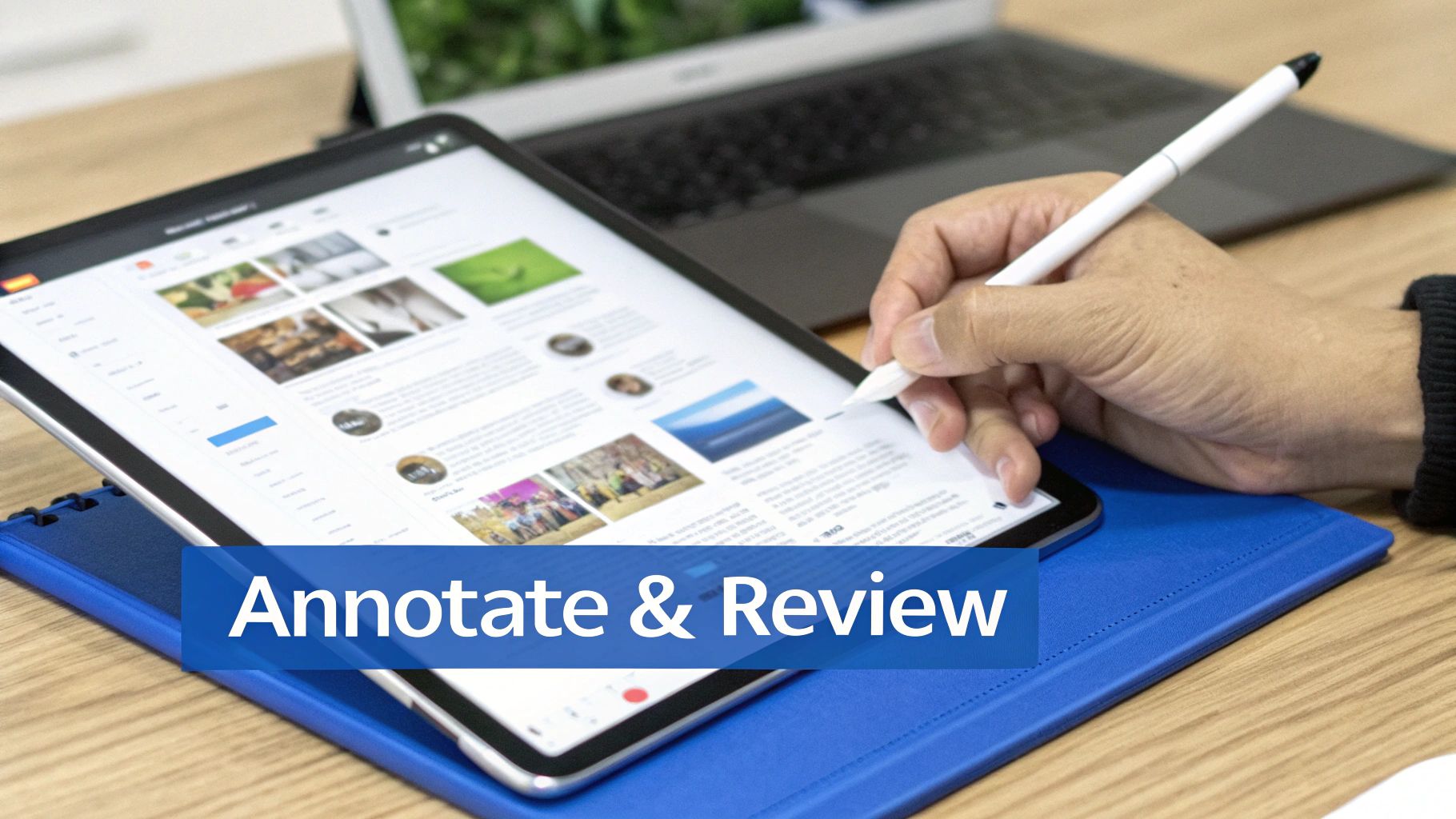
Just opening a PDF is one thing. The real value of a modern pdf reader online comes from the tools that help you dig in, make sense of the content, and work with others quickly and clearly. These features turn a static document into an interactive workspace.
If you’ve ever found yourself endlessly scrolling through a hundred-page report, you know how frustrating it can be. This is where features like thumbnail previews and interactive bookmarks are lifesavers. They let you jump straight to the section you need, turning what was once passive viewing into an active, focused process.
Navigating Complex Documents with Ease
Picture this: you're reviewing a dense architectural blueprint or a detailed financial analysis. Going page-by-page isn’t just slow; it’s a recipe for missing something important. Smart navigation tools are your best friend in these situations.
A good online PDF reader gives you a few different ways to get around:
- Thumbnail View: This gives you a bird's-eye view of the entire document, showing you little previews of each page. It's perfect for spotting a specific chart or image when you don't know the exact page number.
- Bookmarks and Outlines: For properly structured PDFs, a clickable table of contents is a must. You can leap from the introduction to the conclusion in a single click, following the document's built-in map.
These aren't just minor conveniences; they are fundamental for doing deep, focused work. You spend less time fumbling around and more time actually understanding the information.
The goal is simple: spend less time searching and more time thinking. When you can instantly find what you need, you get back valuable minutes and mental energy for the task that actually matters.
Annotation Tools for Clear Collaboration
Annotation is where an online reader really proves its worth, especially when you're working on a team. Think of it as marking up a paper document with a pen, but with way more power and organization.
Here’s a common scenario: a design agency sends a new website mockup to a client for feedback. An email with vague notes like "move the logo a bit to the left on page three" is a classic source of confusion and rework.
This is where annotation tools come in, allowing for direct, contextual feedback. A high-quality pdf reader online will give you a full toolkit for clear communication.
- Highlighter Tool: Perfect for drawing attention to specific sentences or paragraphs that need to be reviewed or discussed.
- Comment Boxes: Add detailed notes or questions right next to the element you're talking about. This keeps all the feedback in one place and easy to follow.
- Drawing Tools: For visual feedback, you can circle a problematic area, draw an arrow to show where something should move, or even sketch a quick suggestion.
Using these tools, the client can give feedback that is crystal clear. The designers see exactly what needs to be changed, which cuts out the guesswork and drastically reduces the number of revision rounds. The whole process becomes faster, less frustrating, and leads to a much better final product.
Smart PDF Sharing and Security Techniques
Once you've marked up your document, you need to get it in front of the right people. But let's be honest—just attaching a PDF to an email feels a bit like sending a postcard. It’s an old-school method that’s often insecure. Using a modern pdf reader online completely changes the game, turning a simple file transfer into a controlled, professional, and secure process.
Think of it this way: sending a regular attachment is like handing out photocopies at a conference. Once they’re out there, you have zero control. You can't update them, you have no idea who’s looking at them, and you definitely can't recall them.
Sharing via a secure link, on the other hand, is like giving someone a key to a private viewing room. You decide who gets a key, you can change the lock whenever you need to, and you can even see who has come and gone. For any professional document, it’s a far smarter way to operate.
Securing Your Intellectual Property
Let’s imagine a real-world scenario. A freelance designer has just polished off a confidential brand identity portfolio for a new tech client. Emailing this sensitive work as an attachment is a huge risk. It could be accidentally forwarded, leaked, or just fall into the wrong hands.
Instead, she uses an online platform to create a secure shareable link. Here’s how she protects her work:
- Password Protection: First, she locks the document with a unique, strong password. This is the simplest yet most effective line of defense, making sure only her client can open it.
- Access Control: By using a link, she keeps a single, authoritative version of the file. If she spots a typo or needs to make a last-minute change, she just updates the original file. The link automatically points to the new version, so there’s no need to send a flurry of "final_v2_final_FINAL" emails.
This simple act of adding a password does more than just secure the file; it shows the client she’s serious about their confidentiality. It’s a small touch that builds a massive amount of trust.
Beyond Basic Passwords: Engagement and Analytics
Smart sharing isn’t just about locking a file down. Many online tools now offer analytics that give you a peek behind the curtain, showing you exactly how people are interacting with your document. You can often see data like:
- How many times the link was opened.
- When it was last viewed.
- Which pages people spent the most time on.
This is gold for a sales team sending a proposal or a consultant delivering a report. For instance, knowing a potential client has looked at your pricing page three times is the perfect cue to pick up the phone.
The ability to share securely and track engagement is what separates amateur file-sharing from a professional content distribution strategy. It's about maintaining control and gaining intelligence.
The PDF's central role in these workflows isn't slowing down. The PDF software market was valued at an impressive USD 2.15 billion in 2024 and is on track to hit USD 5.72 billion by 2033. This growth is fueled by businesses of all sizes using PDFs for everything from internal reports to critical client-facing materials. You can find more details on the PDF market's rapid expansion on pdfreaderpro.com.
For businesses sharing things like menus or catalogs, you can pair this security with easy public access. For example, you can learn how to convert a PDF into a scannable QR code for customers while keeping sensitive internal documents password-protected. And it doesn't stop there—many smart PDF readers also come with robust document signing features, enabling legally binding e-signatures right within the platform. This blend of security, tracking, and functionality is what makes modern PDF tools so essential.
Turn Your PDF into an Interactive Web Page
Sharing a PDF with a link is a great start, but what if you could take it a step further? The real game-changer is turning that static, downloadable file into a fast, interactive webpage. This doesn't require any web development skills; it's all about using a modern platform to publish your content like a pro.
It usually starts with a simple drag-and-drop. You upload your PDF, and the service instantly converts it into a web page that’s optimized for sharing. By distributing it across a global edge network, your content loads in a snap for anyone, anywhere in the world.
This diagram shows just how simple the workflow is—upload, secure, and share.
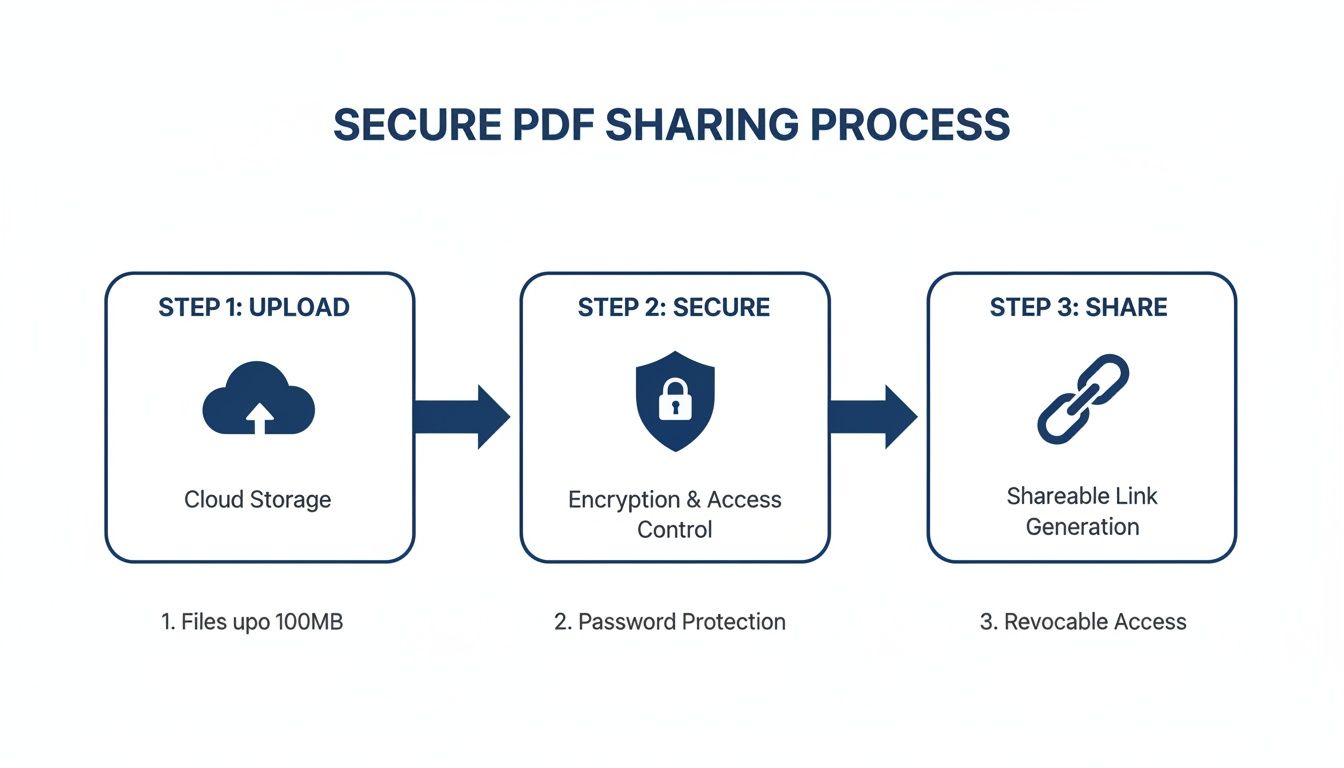
The big idea here is that you can streamline the entire distribution process down to a few clicks, completely removing the technical hurdles.
From Simple Link to Branded Asset
Once your PDF is live as a webpage, you can transform it from a generic link into a professional, branded asset. This is where you graduate from basic file sharing to true online publishing, giving you total control over your audience's experience.
Here are a few ways I've seen this put to good use:
- Connect a Custom Domain: Instead of a long, messy URL, you could serve your company’s sales catalog from a slick domain like
lookbook.yourbrand.com. It immediately builds trust and keeps your branding front and center. - Generate a QR Code: A local restaurant can publish its menu as a webpage and pop a QR code on every table. When the chef updates the specials, the online menu changes instantly—no reprinting required.
- Password-Protect Exclusive Content: A research firm can publish its latest industry report and lock it behind a password. This lets them share it exclusively with paying subscribers or key clients, creating a secure content hub.
Publishing your PDF as a web page gives it permanence and professionalism. It’s no longer just a file; it's a piece of your online presence that you can control, brand, and secure.
This move reflects a bigger shift in how we consume digital content. The market for PDF reader software, valued at USD 1.96 billion in 2024, is expected to hit USD 4.69 billion by 2031. A lot of that growth is tied to the booming eBook market, which shows how these online tools are bridging the gap between static documents and dynamic reading. It’s why you see schools and universities adopting these tools so widely for coursework. You can read more about the rise of electronic readers on persistencemarketresearch.com.
Why Web Page Speed Matters
One of the most underrated benefits of this approach is pure performance. We've all been there: you click a link to a large PDF and are stuck staring at a blank screen while it slowly loads. It's frustrating.
Publishing platforms get around this by converting your PDF into lightweight web assets, much like how an online HTML viewer renders code. If you’re curious about the tech, we break it down in our guide on viewing HTML files online. This conversion process guarantees near-instant load times, which is absolutely crucial for keeping your audience hooked. Just a few seconds of delay can be the difference between capturing a new lead and losing them for good.
This focus on speed and user experience is what makes publishing a PDF as a webpage so powerful. You're not just sharing information—you're delivering it in the most efficient and professional way possible, ensuring your content makes a great first impression every single time. It's a fundamental upgrade from a basic pdf reader online.
Making Your PDFs Ready for AI
So, you've mastered viewing, sharing, and even securing your PDFs. What's next? The real game-changer is preparing your documents for artificial intelligence. The concept of an "AI-friendly" PDF isn't just a buzzword; it's becoming essential for anyone who wants to automate tasks or pull deep insights from their content.
At its core, an AI-friendly PDF is simply a document that's been published to a live, public URL. Instead of being a static file trapped on your computer, it becomes a readable source on the internet, accessible just like any other webpage. This one small shift makes a world of difference.
Why a Live Link is a Game-Changer for AI
Think about how AI models like ChatGPT, Claude, and Gemini work—they're built to crawl and process information from the web. They can't see the file sitting on your desktop or the one you just attached to an email. By publishing your PDF to a live link with a service like Hostmora, you're essentially handing the AI a key to unlock its contents.
This opens up a ton of new possibilities. You can just drop the link into an AI prompt and ask it to do things that would've taken you hours by hand.
The big idea here is to stop thinking of your PDF as a finished, static product and start treating it as a live data source. A public URL is what makes its content available for analysis, summarization, and connection to automated workflows.
Let’s look at a real-world scenario. Imagine a market researcher has just finished a massive 50-page report on consumer trends. Instead of tediously copying and pasting key sections into an AI chat window, they can publish the report to a unique URL.
- They feed this single link to their AI assistant.
- The AI is instructed to read the entire document from that URL.
- Then, it can instantly generate an executive summary, pull out the most important statistics, or even draft a series of social media posts highlighting the key findings.
What was once a manual, time-consuming chore becomes a simple, streamlined process.
Putting AI-Readiness into Practice
The applications go way beyond research. A developer could share technical documentation via a link and ask an AI to generate code snippets based on the API specs. A startup could publish a PDF compiling customer feedback and have an AI analyze it for common pain points. Even teachers can share course materials online and use AI to quickly create pop quizzes or study guides for their students.
As you prepare your documents for AI, remember that content integrity is key. For instance, if you're dealing with global audiences, learning how to translate a PDF while perfectly preserving its formatting is critical for maintaining a professional look.
By making sure your documents are well-structured, accessible, and live on the web, you're setting them up for the next wave of digital tools. This makes your pdf reader online workflow not just more efficient, but a whole lot smarter.
Common Questions About Online PDF Readers
Switching to a pdf reader online is a smart move, but it's totally normal to have questions before you dive in. I hear them all the time. People often wonder about security, what "editing" really means in this context, and how sharing a link is any different from an email attachment.
Let's clear up some of the most common questions I get. Getting these answers straight will help you use these tools with a lot more confidence.
Is It Safe for Confidential Documents?
The short answer is yes, but it really boils down to the service you're using. Any legitimate online PDF platform will use SSL encryption to keep your data safe while it's in transit—that's the same security protocol your bank uses.
But if you're dealing with something truly sensitive, like a financial report or a client contract, you'll want an extra layer of defense. Look for a platform that lets you password-protect the shared link itself. This is a game-changer because it ensures that even if the link gets forwarded, only people with the password can open it.
Can I Actually Edit Text in a PDF Online?
This is a big point of confusion. Most online readers are built for viewing and annotating—think highlighting passages, adding comments in the margins, or drawing arrows. They're fantastic for collaboration and feedback.
However, they aren't designed for deep text editing. While a few high-end services offer some basic text-changing features, it can often mess with the document's formatting.
My rule of thumb is this: if you're giving feedback on a design proof or a draft report, an online annotator is perfect. If you need to rewrite paragraphs or change the fundamental structure, stick with a dedicated PDF editor before you publish and share it.
What Is the Difference Between a PDF Link and an Attachment?
This is one of the most important distinctions to understand. When you email a PDF as an attachment, you're sending out copies. You immediately lose control. You can't un-send it, you can't update it after the fact, and you're at the mercy of email server limits, which usually cap out around 25 MB.
A live link is just so much better. It points to a single, central version of your document. If you spot a typo and fix the original file, everyone with the link instantly sees the updated version. You can also track views, add or remove passwords, and never worry about file size again. It’s simply a more professional and secure way to share information.
How Does Making a PDF AI-Friendly Actually Work?
This is where things get really interesting. When you publish your PDF to a live URL using a service like Hostmora, it stops being a static file and becomes a web page. Just like any other website, AI models can now "crawl" and read its content. This just isn't possible with a file sitting on your desktop or buried in a SharePoint folder.
By giving your document a public-facing URL, you can feed its content directly into AI tools for summarization, analysis, or research. It completely removes the painful step of copying and pasting text, letting you put AI to work on your documents in a much more direct and intelligent way.
Ready to turn your PDFs into fast, secure, and AI-friendly web pages? With Hostmora, you can drag, drop, and publish in seconds—no code required. Get started for free on hostmora.com.