
So, you've built a website with HTML, CSS, and maybe a little JavaScript. The files look great on your computer, but how do you get them online for the world to see? That's where HTML website hosting comes in.
Think of it as the final, crucial step in bringing your creation to life. It’s the service that takes your website's files and puts them on a special, always-on computer (a server) so anyone, anywhere can access them through the internet. Essentially, hosting is the digital plot of land where your online presence lives.
What Is HTML Website Hosting, Really?

Let's stick with the house analogy. Your HTML files are the architectural blueprints, your CSS files are the paint colors and interior design, and your JavaScript files are the interactive elements like smart lighting or a garage door opener. You have all the pieces, but until you place the house on a piece of land with a street address, no one can visit.
HTML website hosting provides that plot of land and the address (your domain name). When someone types your domain into their browser, it sends a request to the server where your files are stored. The server then sends those files back, and voilà—your website appears on their screen.
The Power of Simplicity With Static Hosting
For most projects built with just HTML, CSS, and JavaScript—like portfolios, landing pages, or online menus—the simplest solution is often the most powerful. This is where static hosting shines.
A static site is like a pre-fabricated home. Everything is already built and ready to go. When a visitor shows up, the server doesn't have to assemble anything on the fly; it just hands over the finished product. This approach is incredibly efficient and offers some major perks for creators and small businesses:
- Blazing-Fast Speed: Because the files are pre-built, they load almost instantly. This is a huge deal, especially when you know that 53% of mobile users will bounce if a site takes more than three seconds to load.
- Rock-Solid Security: With no complex backend or database, there are far fewer doors and windows for potential attackers to target. It’s inherently more secure.
- Lower Costs: Static hosting uses fewer server resources, making it much more affordable. Many platforms even offer generous free tiers for smaller projects.
The growing demand for easy online solutions is why the web hosting market, valued at $94.64 billion in 2022, is on track to hit $159.9 billion by 2026. Shared hosting, a common choice for static sites, currently makes up 37.64% of that market, proving just how popular these straightforward solutions are.
Skipping the Old-School Complexity
Not too long ago, getting a simple HTML site online was a chore. You had to wrestle with confusing control panels, use clunky FTP clients to upload files, and manually tweak server settings. It was a technical headache that kept many great projects stuck on local computers.
The game has completely changed. Modern no-code platforms are built to erase that friction, letting you go from a folder of files on your desktop to a live, secure website in a matter of seconds.
These tools automate the entire workflow. You just drag and drop your files, and the platform handles everything else: setting up the storage, adding an SSL certificate for security, and even distributing your site across a global network for top-tier performance. This simplicity makes static website hosting the perfect fit for anyone who wants to focus on creating, not configuring.
Understanding Static vs. Dynamic Hosting
When you're looking for a home for your HTML website, one of the first crossroads you'll hit is choosing between static and dynamic hosting. Getting this right from the start saves a ton of headaches later.
Think of it like this: a static website is a pre-printed brochure. The design and content are fixed. When someone asks for it, you just hand them an identical copy. It's incredibly efficient because the work is already done.
A dynamic website, on the other hand, is like a custom-made coffee. The barista takes an order, grinds the beans, pulls the espresso, and steams the milk all while you wait. It’s personalized and powerful, but it requires a lot more work on the spot.
For the vast majority of projects built with pure HTML—like portfolios, landing pages, or simple business sites—the static approach is the clear winner. The server has one simple job: grab the right file and send it. That simplicity is its superpower.
The Power of Static HTML Hosting
Choosing the static route unlocks some serious advantages, especially when it comes to speed, security, and your wallet.
Since the server is just delivering a finished file instead of building one on the fly, the performance is incredible. Pages load almost instantly, which is a massive win for keeping visitors engaged and getting a nod of approval from search engines like Google.
Security gets a huge boost, too. Dynamic sites often rely on server-side languages and databases, creating more doors and windows for potential troublemakers. A static site is like a sealed vault; with no active scripts or database connections, the attack surface is tiny, making it inherently safer.
Static hosting strips away the complexity. The server doesn't need to think; it just needs to deliver. This leads to faster load times, tighter security, and lower operational costs—a trifecta of benefits for any straightforward web project.
Best of all, this elegant simplicity means lower costs. Static hosting requires far less computing power, so providers can offer really affordable plans, many with generous free tiers. It’s the perfect way to get your work online without breaking the bank.
When Dynamic Hosting Makes Sense
While static is fantastic for HTML-first projects, it's not a one-size-fits-all solution. Dynamic hosting is the workhorse behind the complex web apps we use every day. You'll absolutely need a dynamic setup if your site requires features like:
- User Accounts: Letting people sign in to see personalized dashboards or content.
- E-commerce Functionality: Running an online store with shopping carts, payment processing, and inventory management.
- Content Management Systems (CMS): Using platforms like WordPress where you can update content from a user-friendly dashboard.
- Interactive Social Feeds: Displaying real-time, user-generated content.
These features demand constant communication between the server and a database to build custom pages for each visitor. This back-and-forth adds a bit of a delay and requires more powerful (and usually more expensive) hardware. If you're curious about providers who handle this well, our breakdown of the best static website hosting providers for 2026 offers some great insights.
In the end, the right choice boils down to what your project actually needs to do. For a pure HTML website, the speed, security, and cost-effectiveness of static hosting are tough to beat. It gives you a rock-solid, professional foundation without the unnecessary overhead of a more complex system.
Key Features to Look for in an HTML Hosting Platform
When you're picking a host for your HTML website, it's easy to get bogged down in specs like storage space and bandwidth. But honestly, for most static sites, those numbers are more than enough. The real difference comes from the features that make your life easier, your site faster, and your brand look more professional.
Think of it this way: you're not just renting an empty plot of land for your files. A modern hosting platform is more like a full-service business park, equipped with security, a high-speed delivery network, and a custom address right out of the box. Let's dig into what those essential services really are.
Automatic SSL Certificates for Security and Trust
First things first: SSL (Secure Sockets Layer) certificates are absolutely non-negotiable. An SSL certificate encrypts the data flowing between your site and your visitor's browser, keeping it safe from prying eyes. You'll know a site has one when you see that little padlock icon in the address bar.
These days, browsers like Chrome will slap a "Not Secure" warning on any site without SSL. That's an instant trust-killer. Thankfully, the old days of manually buying and renewing these certificates are gone. Any decent host will now automatically provide and renew a free SSL certificate for you, no fuss required.
Global CDN for Blazing-Fast Load Times
A Content Delivery Network (CDN) is one of those behind-the-scenes technologies that makes a massive difference in user experience. It's basically a network of servers spread across the globe, all holding a copy of your website.
So, when someone in London visits your site, they get the files from a server nearby in Europe, not from one all the way over in California. This drastically cuts down on loading time, or latency. For a portfolio, an e-commerce site, or any content-heavy page, that instant-loading feeling is what keeps people from clicking away.
A CDN is the secret ingredient to world-class performance. By bringing your content physically closer to your users, it eliminates the lag caused by distance, providing a seamless experience for every visitor, everywhere.
Custom Domain Support for Your Brand
While a temporary URL from your host is fine for testing, you need a custom domain (like yourcompany.com) to look professional. The best HTML website hosting services make it incredibly simple to connect a domain you already own.
This is the difference between having a stall at a flea market and opening a proper shop with your name above the door. A custom domain builds brand recognition and makes you memorable.
Essential Tools for Creators and Agencies
Beyond the big three, a few other practical tools can make a huge difference in your day-to-day workflow.
- Password Protection: Need to share a work-in-progress with a client? Or maybe you have a private resource page for your team? This feature lets you lock down an entire site with a single password. It's perfect for previews and private content.
- Built-in Analytics: While you can always hook up Google Analytics, sometimes you just need a quick snapshot of your traffic. Simple, built-in analytics that show page views and unique visitors can give you a clear picture of what's popular without any complex setup.
The shift toward these all-in-one solutions is a big reason the web hosting industry is projected to reach $162.09 billion by 2026. Creators and small businesses are voting with their wallets for platforms that handle the technical headaches. With security-related lawsuits up 20% and a staggering 92.4% of HTML5 sites having accessibility errors, integrated tools like SSL and simple analytics aren't just nice to have—they're critical. Discover more insights about key web hosting statistics on elementor.com.
Ultimately, these features do more than just host your files. They create a powerful publishing engine that automates the tough stuff, letting you get back to what you do best: creating great work.
Comparing Different HTML Hosting Methods
Choosing the right place to host your HTML website can feel like picking the right tool for a job. Do you need a classic, all-purpose hammer, or a high-powered, specialized nail gun? The best choice really depends on what you're trying to build and how much technical heavy lifting you want to do yourself.
When it comes to hosting a simple HTML site, you've got three main paths you can take: old-school shared hosting, powerful cloud storage services, and modern no-code platforms. Each one comes with its own set of trade-offs in terms of complexity, speed, and overall user-friendliness.
The Traditional Shared Hosting Route
Think of traditional shared hosting as that reliable, dusty toolbox in the garage. It has everything you could possibly need, but you have to know which tool to grab. This approach usually means logging into a cPanel dashboard—a powerful but often overwhelming interface packed with options you’ll never touch for a simple HTML site.
To get your website live, you’ll have to use something called an FTP (File Transfer Protocol) client. It’s a separate application just for moving your files from your computer to the server. It works, but it feels like a clunky, multi-step process from a bygone era. It’s a bit like having to manually connect a series of pipes just to get the water running.
The Powerhouse Cloud Storage Method
Next up is using a major cloud storage provider like Amazon S3 or Google Cloud Storage. This is the industrial-grade, heavy machinery of hosting. It offers incredible power, global scale, and meticulous control, making it perfect for applications that need to serve millions of users.
But all that power comes with a seriously steep learning curve. Just to get a basic static website online, you'll find yourself configuring storage "buckets," wading through complex permission policies, and manually tweaking DNS settings. For a simple portfolio or a landing page, it’s like using a commercial crane to lift a single box. It’s overkill.
This flowchart shows how modern platforms simplify the decisions around must-have features like security and speed.
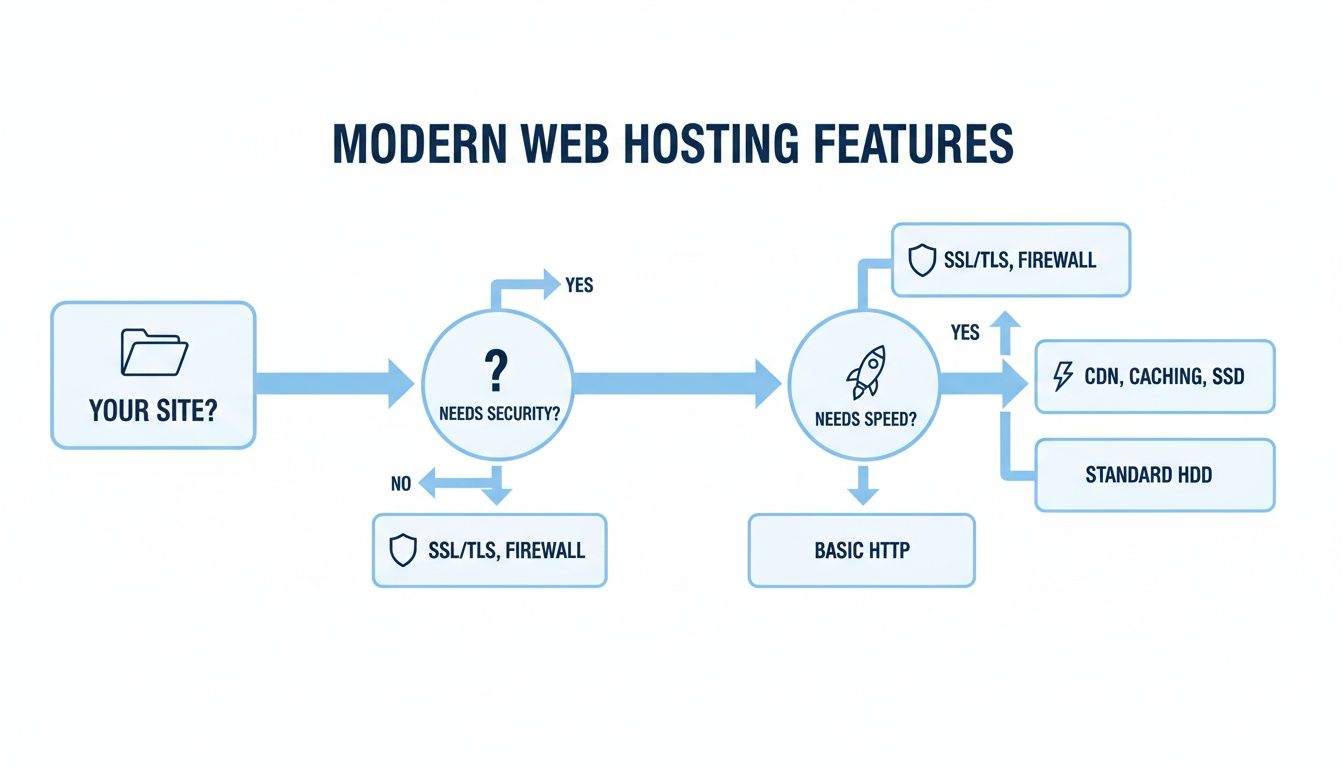
As you can see, essentials like SSL certificates for security and a CDN for speed are built-in from the start, not treated as complicated extras you need to configure.
The Modern No-Code Platform Approach
Finally, we have modern no-code platforms like Hostmora. Think of this as the "point and shoot" option. You know what you want to publish, and the platform handles absolutely everything else to get it online instantly. The entire process is designed around speed and simplicity.
These platforms are purpose-built for static assets like HTML, CSS, and JavaScript files. The workflow is often just a single action: drag and drop your website's ZIP file, and you get a live, secure URL in seconds. No cPanel, no FTP, no complicated menus. All the critical features like SSL, a global CDN, and asset optimization are just handled for you automatically.
The whole point of the no-code approach is to get rid of the friction. If you're a freelancer trying to get client work live or a small business launching a new landing page, this direct path is a game-changer.
While dynamic platforms like WordPress famously power a massive 43.5% of all websites, simple static HTML is still the perfect tool for portfolios, resumes, and event pages. Shared hosting, a common choice for these sites, still holds a huge 37.64% of the hosting market. Platforms like Wix, with over 110 million customers, have proven there’s a massive demand for simplicity.
And speed is non-negotiable—research from Reboot Online highlights that just a 1-second delay in page load time can slash conversions by 7%. When you compare the technical skills required and how quickly you can get a site live, it's easy to see why no-code platforms are becoming the default for creators who just need their work online, fast.
Which HTML Hosting Method Is Right for You?
To make the decision clearer, let's break down how these three approaches stack up against each other based on what matters most: your time, your technical comfort level, and your project's needs.
| Factor | Traditional Shared Hosting | Cloud Storage (AWS S3) | No-Code Platform (Hostmora) |
|---|---|---|---|
| Technical Skill | Intermediate (Requires cPanel & FTP) | Expert (Requires cloud & DNS config) | Beginner (Drag-and-drop) |
| Speed to Launch | Slow (Minutes to hours) | Very Slow (Hours to days) | Instant (Seconds) |
| Core Features | Manual Setup (SSL, etc.) | Manual Setup (Everything) | Automatic (SSL, CDN included) |
| Best For | Users comfortable with traditional hosting panels and multi-step processes. | Developers building large-scale applications needing granular control. | Creators, agencies, and businesses who need to publish fast without hassle. |
Ultimately, the best method is the one that gets your website in front of your audience with the least amount of resistance. For most simple HTML sites, the modern no-code approach offers an undeniable advantage in speed and simplicity.
Get Your Website Live in Under 60 Seconds

Alright, we’ve covered the what and why of HTML website hosting. Now for the fun part: taking your project from a folder on your desktop to a live website anyone can visit. This shouldn't be some complicated, multi-hour ordeal. With the right tools, you can launch a site in less time than it takes to make a cup of coffee.
The process I'm about to show you boils down a once-technical task into four simple steps. No command lines, no server configurations—just a straight shot from your files to a live URL.
The 4-Step Launch Sequence
Forget about wrestling with old-school FTP clients or navigating confusing control panels. The modern way to publish a static HTML website is built on a simple drag-and-drop action.
- Sign Up for Free: The first thing you'll need is an account with a platform like Hostmora. You can get started with a free plan, and you won’t even need to pull out your credit card to get your first site online.
- Zip Up Your Project: Find your website's main folder—the one that holds your
index.htmlfile and all your other assets like CSS, JavaScript, and images. Just right-click on that folder and compress it into a single.zipfile. - Drag, Drop, Done: Log into your Hostmora dashboard and just drag that
.zipfile you made right into the upload box. That single motion is all it takes to kick off the entire deployment. - Grab Your Live Link: Almost instantly, the system will unpack your files, set everything up, and give you a unique, secure URL. That’s it. Your site is officially live and ready to share with the world.
This is the heart of what modern HTML website hosting is all about—speed and simplicity. For a more detailed walkthrough, check out our guide on how to upload your HTML file and get a shareable link.
The goal of today’s hosting platforms is to get out of your way. Publishing should be an afterthought, not a roadblock, letting you focus on what you actually enjoy: building and designing.
Taking It From a Project to a Profession
Once your site is up and running, a few extra touches can make it feel polished and professional. These features are usually just a click away in your project dashboard, so there's no need to be a tech wizard.
A huge step is swapping out the temporary URL for your own. You can easily add a branded domain by following a straightforward tutorial on connecting a custom domain. It’s one of the fastest ways to make your site feel legitimate.
From there, you can add other powerful features:
- Add Password Protection: Need to share a work-in-progress with a client or keep a project private? You can lock down the entire site with a simple password, giving you complete control over who sees it before the big reveal.
- Generate a QR Code: With a single click, you can create a QR code that points straight to your new website. This is perfect for bridging the physical and digital worlds—think business cards, restaurant menus, event posters, or product packaging.
Best Practices for Managing Your Live HTML Site
Getting your HTML website live is a fantastic achievement, but the real work has just begun. Keeping a site polished and running smoothly is an ongoing effort, but it doesn't have to be a headache. A few simple habits can save you a world of trouble down the line and ensure your online presence always looks professional.
Think of your website's files on your computer as your workshop—your command center. Keeping this local version neatly organized is the secret to stress-free updates. When it's time to make a change, you'll know exactly where to find the right file, avoiding that sinking feeling of accidentally uploading an old version.
A well-managed website screams professionalism. Simple things like optimizing your images and keeping your local files in order aren't just technical chores; they're the bedrock habits for maintaining a high-quality site with minimal fuss.
Keep Your Local Files Tidy
Before you even think about uploading, get your folder structure sorted out on your own computer. This creates your "single source of truth," making updates a breeze instead of a guessing game.
A clean, logical structure usually looks something like this:
index.html: The main homepage file, sitting right in the root folder./css: A dedicated spot for all your CSS stylesheets./js: A folder to keep all your JavaScript files together./images: The go-to place for photos, icons, and other visual assets.
Organizing things this way means you can find a file in seconds when you need to tweak a style or swap out a photo. It also makes zipping up the whole project for a quick re-upload incredibly simple.
Optimize Assets Before Uploading
Nothing kills a website's performance faster than huge, uncompressed images. They're the number one culprit for slow load times. Before you drop any image into your project, make sure it’s ready for the web. Use an image compression tool to shrink its file size without destroying the quality.
Don't forget to use descriptive file names, too. A file named contact-page-hero-banner.jpg is infinitely more helpful than IMG_8472.jpg. This habit not only keeps you organized but also gives your SEO a little boost, since search engines can better understand what the image is about. You can even explore offloading your assets to a free image hosting service to help with delivery.
Test Across Multiple Devices
People will be visiting your site on everything from massive desktop monitors to tiny phone screens. It's absolutely crucial to check how your site looks and feels across different browsers and screen sizes, both before and after you publish an update.
You can use your browser's built-in developer tools to quickly simulate various devices. This simple check helps you spot layout problems or broken elements before your visitors do, ensuring everyone gets a smooth experience. For freelancers or agencies juggling multiple client projects, platforms like Hostmora can make this whole process much easier by letting you manage every site from a single, clean dashboard.
Common Questions About HTML Website Hosting
Getting your website from your computer to the internet often brings up a few last-minute questions. It’s totally normal. But once you understand a few key things about HTML website hosting, you'll see just how simple modern platforms have made it. Let's tackle some of the most common queries.
Can I Host a Website with Just One HTML File?
Absolutely! At its core, the simplest website on the planet can be a single index.html file. Modern hosting platforms are built for exactly this—you can often just drag and drop that one file and be live in seconds.
Of course, most sites are a little more complex. You’ll likely have CSS for styling, JavaScript for interactivity, and folders for images or fonts. In that case, the standard practice is to just zip up the entire project folder and upload that. It's just as easy.
Is Free HTML Website Hosting Actually Safe?
This is a great question, and the answer really comes down to the provider you choose. Reputable services don't treat security as an optional extra; it's a fundamental part of their platform, even for free plans. The most important thing to look for is a free, automatic SSL certificate.
An SSL certificate encrypts the data between your site and your visitors, which is non-negotiable for building trust today. Free plans from established platforms are generally very reliable for things like portfolios, landing pages, or test projects. The key is to pick a provider that makes security a default, not a paid upgrade.
Choosing a host is a bet on their infrastructure. A quality free plan isn't a lesser service; it's a demonstration of the platform's reliability and commitment to security for every user, regardless of their budget.
How Do I Update My Website After It Is Live?
Updating your site should be just as painless as the first time you published it. With a modern, file-based hosting platform, the whole process is designed to be quick and straightforward.
- Make Changes Locally: First, edit your HTML, CSS, or JavaScript files on your own computer.
- Re-upload Your Project: Then, simply drag the updated file or the new zipped project folder back into your hosting dashboard.
That’s it. The platform takes care of everything else, pushing the new version of your site across its global network. The best part? This happens with zero downtime, so your visitors see the fresh content instantly without any disruption.
Do I Need Coding Skills to Host an HTML Website?
While you obviously need HTML files to have a website, you do not need any coding skills for the hosting part itself. Plenty of people use website builders or download ready-made templates that generate all the files for them.
From that point on, modern no-code hosting platforms handle all the technical heavy lifting. You won’t have to configure a server, open a command line, or figure out a complicated control panel. It really is as simple as uploading a file.
Ready to publish your HTML site in seconds? With Hostmora, you can drag and drop your files and get a live, secure link instantly. Get started for free on hostmora.com.