

Ever wondered how big websites manage to have separate, clean-looking sections for their blog, shop, or support pages? The secret is usually subdomains. Creating one is a lot less technical than it sounds—it's often just a matter of adding a new A or CNAME record through your domain registrar to point a prefix, like blog, to a specific server.
Why Subdomains Are a Smart Move for Your Website
Think of your main domain as your house and subdomains as clearly labeled rooms inside. Each room serves a unique purpose and can even have its own distinct style, all without changing the main structure of the house. This is what makes them such a powerful organizational tool, not just some tech-world jargon.
For example, a photographer might use portfolio.website.com to cleanly separate their gallery from their main business site. A restaurant could use menu.restaurant.com to give customers a direct, no-fuss link to what they're looking for.
The Strategic Advantages of Using Subdomains
This separation pays off in several ways, leading to a much more organized and effective online presence. By keeping different parts of your operation distinct, you create a smoother experience for visitors and a much simpler management process for yourself.
Here are the main reasons I see people set up subdomains:
- Improved User Experience: Sending a customer to support.yourcompany.com is just plain easier and more memorable than a long, clunky URL. It feels professional.
- Enhanced Organization: You can run entirely different platforms on subdomains. Imagine a learning portal on courses.yoursite.com, completely separate from your main marketing site.
- Targeted SEO Opportunities: Search engines often view subdomains as separate entities. This is a huge advantage if you want to build authority for a niche topic on blog.yourbrand.com without distracting from the commercial focus of your main site.
A great real-world application of this is a WordPress Multisite strategy, which really shows off how you can manage an entire network of distinct sites from one central dashboard. It's a game-changer for scalability.
Here's a quick look at how businesses and creators use subdomains to organize their digital operations effectively.
Common and Creative Subdomain Use Cases
| Use Case | Subdomain Example | Primary Benefit |
|---|---|---|
| Blogging | blog.yourbrand.com |
Separates content marketing from your main sales site, allowing for distinct SEO strategies. |
| E-commerce Store | shop.yourbrand.com |
Creates a dedicated, secure environment for transactions without cluttering the primary site. |
| Customer Support | help.yourcompany.com |
Centralizes all support articles, FAQs, and contact forms for easy user access. |
| Staging/Testing | staging.yourwebsite.com |
Provides a private space to test new designs and features before pushing them live. |
| Regional Sites | uk.yourbrand.com |
Delivers targeted content, pricing, and language for different geographic audiences. |
| Mobile Version | m.yoursite.com |
Offers a simplified, mobile-optimized experience (though less common with responsive design). |
As you can see, the possibilities go far beyond just a blog. Subdomains give you the flexibility to build out dedicated experiences for nearly any part of your business.
Modern Tools Simplify the Process
Setting up subdomains has become a fundamental part of a good web strategy. With the global domain market expected to grow from 379.2 million registered names in 2020 to 557.7 million by 2026, the need for smart organization is only increasing.
Thankfully, platforms like Hostmora now make this incredibly simple, removing the need to manually poke around in DNS settings. For agencies I've worked with, this is a lifesaver. You can upload a client project as a ZIP file, connect a custom domain, and spin up a subdomain like client-project.agency.com in minutes, SSL included.
Decoding the Language of Your DNS Zone
Before you jump into creating your first subdomain, it helps to get comfortable with the basic building blocks you’ll find inside your DNS zone. You don't need to become a network engineer overnight, but knowing what you're doing—and why—gives you the confidence to manage your domain effectively.
Think of your DNS zone as a digital address book for your domain. Each entry, or "record," tells internet traffic exactly where to go for different services. Understanding these records makes troubleshooting a breeze and clarifies what’s happening behind the scenes, even when tools like Hostmora are doing the heavy lifting for you.
If you're still a bit fuzzy on the fundamentals, like the difference between a website and a domain name, NameSnag has a fantastic guide that breaks it down: Website vs Domain Name Explained in Simple Terms.
The Core DNS Record Types for Subdomains
While your DNS zone can contain dozens of record types, you'll really only need to know three of them for most subdomain setups. Each one has a specific job.
A Record (Address Record): This is the most straightforward of the bunch. An A record points a name (like
blog.yourdomain.com) directly to a server's numeric IP address. It’s the digital equivalent of giving someone a precise street address.CNAME Record (Canonical Name): Think of a CNAME as a forwarding address. Instead of pointing to an IP, it points one name to another name. A classic example is pointing
shop.yourdomain.comto a platform-specific URL likeyour-store.myshopify.com. You'll see this all the time when connecting to third-party services.NS Record (Name Server): This one is more of a delegation. An NS record tells the internet that a different set of name servers is responsible for managing a specific subdomain. It’s an advanced move, but incredibly useful for agencies who want to manage a client project at
client.agency.comwithout taking over the mainagency.comdomain.
Getting the hang of A vs. CNAME records is key. An A record is a direct pointer to a server’s location. A CNAME is just an alias. The one you choose depends on whether you have an IP address or another domain name to work with.
Choosing the Right Record for Your Goal
So, which one should you use? It all comes down to what you're trying to accomplish.
If you’re hosting a part of your site on a server and you have its IP address, an A record is what you need. It’s clean and direct.
But if you're connecting a service like a helpdesk, e-commerce platform, or email marketing tool, they will almost always provide you with a CNAME value. This is smart because it lets them manage the server details on their end, so you never have to worry if their IP address changes. If you want to see more examples, our guide on how to show DNS records can help.
And what about NS records? You'll use these far less often, but they're invaluable when you need to hand over complete DNS control of just one subdomain to another service or team.
A Practical Guide to Creating Subdomains with A and CNAME Records
Alright, let's get our hands dirty. This is where we move from theory to practice. To create your first subdomain, you'll need to add a simple entry in your domain's DNS management panel. You can almost always find this in the dashboard your domain registrar provides, whether it's GoDaddy, Namecheap, or another service.
You'll primarily be using one of two methods: creating an A record or a CNAME record.
The one you choose really just depends on what you're trying to connect your subdomain to. Do you have a server with a specific IP address? Or are you pointing your subdomain to another service’s domain name? Your answer to that question will tell you exactly which record type to use.
The diagram below gives you a great visual of how these fundamental DNS records work to route traffic across the internet.
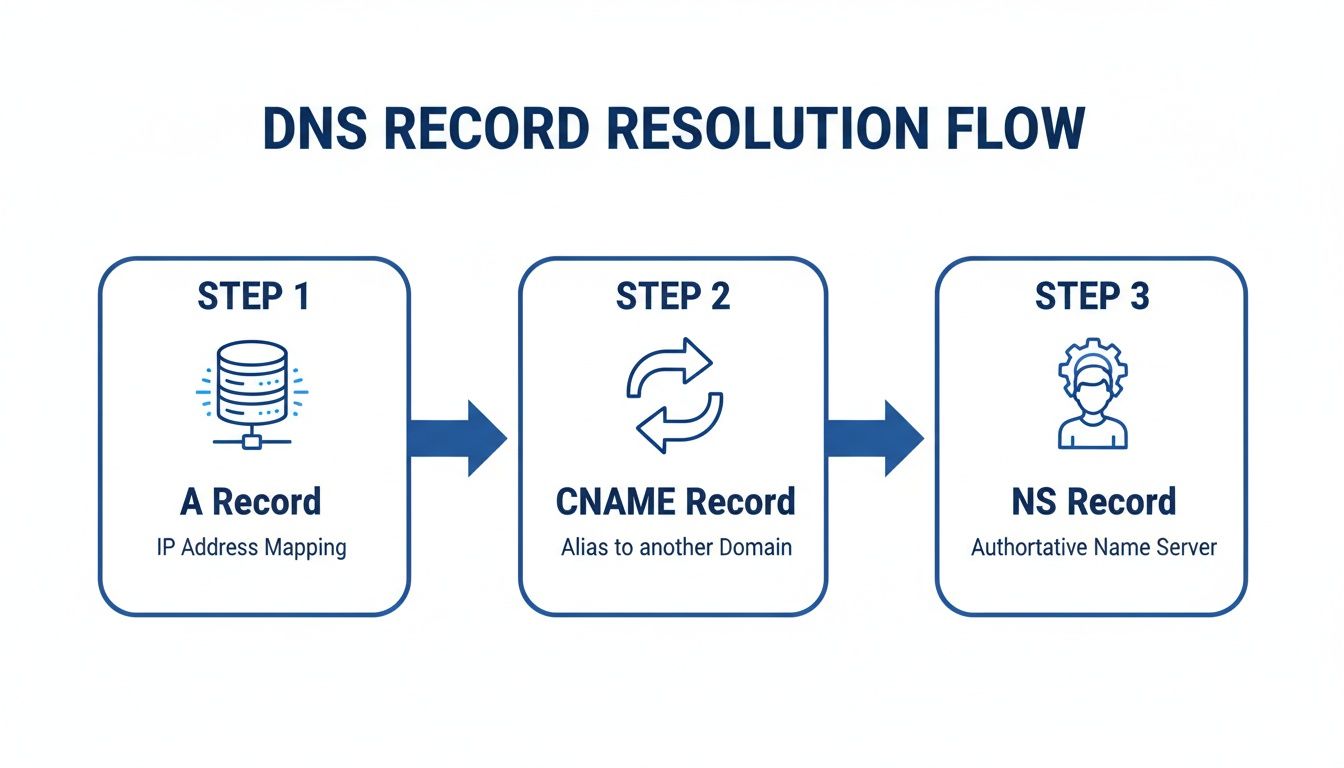
As you can see, A records act like direct street addresses, while CNAMEs are more like forwarding instructions. NS records, on the other hand, are like managers, delegating responsibility for different parts of your domain.
Pointing to a Server with an A Record
Let’s say you have a specific part of your website, like a storefront, hosted on its own dedicated server. Your hosting provider will give you an IP address for it. In this situation, an A record is exactly what you need.
It creates a direct, one-to-one link between your subdomain and that server's IP address. The setup is straightforward and usually looks something like this:
- Type: A
- Host/Name:
shop(This is just the prefix for your subdomain) - Value/Points to: The server's IP address
- TTL (Time to Live): It’s usually best to just leave this at the default setting.
Once you save this, anyone typing shop.yourstore.com into their browser gets sent directly to the server at that specific IP. It's clean, efficient, and the most common way to point a subdomain to hosting that you manage yourself. If you're curious about how this might look with a specific provider, our guide on managing a domain name with OVH walks through a similar process.
Using a CNAME Record to Connect Services
Now, let's talk about an even more common scenario these days: connecting your subdomain to a third-party platform. Think of services like Shopify for e-commerce, a landing page builder, or a helpdesk platform. They almost never give you an IP address. Instead, they’ll give you a CNAME value to use.
A CNAME record essentially acts as an alias, pointing your subdomain to another domain name. For instance, you might point blog.yourbrand.com to a unique URL that your blogging platform provides. This is actually a brilliant setup. If that platform ever changes its server IP addresses, your connection won't break because they just update the destination on their end, and your CNAME record keeps working perfectly.
The configuration for a CNAME is just as simple:
- Type: CNAME
- Host/Name:
blog - Value/Points to: The target domain provided by the service (e.g.,
hosting.provider.com) - TTL (Time to Live): Again, just stick with the default.
Pro Tip: A CNAME record can only be used for subdomains. You can't create one for a root domain (like
yourdomain.com). This is a fundamental DNS rule that trips up a lot of people when they're starting out.
How Subdomain Management Has Evolved
It wasn't always this easy. Back in the 1990s, this was a far more complex, manual process. We've gone from wrestling with DNS configurations to the no-code bliss we enjoy today, a shift that mirrors the massive growth in domain registrations—which hit 364.3 million in Q4 2024.
With creators and agencies demanding simplicity, platforms like Hostmora have really stepped up. For digital agencies, this evolution is a game-changer. You can now deploy secure subdomains for prototypes and client sites across a global network without ever having to touch a single DNS config file.
Services like Hostmora completely streamline the process. Instead of you manually creating records and hoping for the best, you’re often just given a simple value to copy and paste. The platform handles all the complex parts behind the scenes, making sure your subdomain points to the right place securely and efficiently. It completely removes the guesswork.
Using NS Records for Advanced Subdomain Delegation
While A and CNAME records get the job done for most everyday tasks, sometimes you need to pull out the bigger tools. What happens when you need to give another service or team complete DNS control over a subdomain, but you can't—and shouldn't—hand over the keys to your entire domain?
This is precisely where delegation using NS (Name Server) records shines.
Think of it this way: A and CNAME records are like giving someone directions to a specific place. An NS record, on the other hand, is like giving them the entire map and telling everyone else to ask them for directions from now on. It’s a powerful technique, especially for agencies managing client projects or for developers integrating complex services that need to manage their own DNS.
Let’s say you're an agency building a site for a client on Hostmora under client-project.agency.com. By creating NS records for that specific subdomain, you can give Hostmora full authority over it. This allows the platform to automatically manage all the necessary DNS entries for the project without you ever needing to interfere with the primary agency.com domain, which keeps handling your main website and email without a hiccup.
Why Would You Delegate a Subdomain?
Delegating DNS control isn't just a neat technical trick; it has some serious practical upsides, particularly when it comes to security and streamlined management. By isolating a subdomain's DNS, you create a clean separation of duties.
Here’s why this approach is so valuable:
- Hands-Off Management: The third-party service (like a hosting platform) can directly manage all of its required records—A, MX, TXT, you name it—for that subdomain. This takes you out of the middle, saving a ton of time and preventing pesky configuration errors.
- Tighter Security: You avoid sharing the login credentials for your primary domain registrar. The delegated service only gets control over its designated subdomain, which dramatically reduces the risk of accidental or malicious changes to your core domain.
- Ultimate Flexibility: Delegation lets services dynamically update DNS records whenever they need to. This is a common requirement for complex platforms that might change server IPs or add verification records without having to ask for your permission every single time.
Delegating with NS records is the ultimate “set it and forget it” for advanced integrations. You’re essentially telling the world, “For anything related to
project.yourdomain.com, go ask these other name servers. They’re in charge now.”
How to Create NS Records for Delegation
Setting up NS records feels a lot like adding an A or CNAME record, but the information you'll input is fundamentally different. Instead of an IP address or a domain alias, you’ll be pointing your subdomain to a set of name servers provided by the third-party service.
When you're ready to delegate, the service you're connecting to—like Hostmora—will give you two or more name server addresses. They usually look something like ns1.service.com and ns2.service.com.
You'll head over to your domain registrar’s DNS management panel and create multiple NS records—one for each name server they provided.
Here’s a breakdown of what that configuration typically looks like:
- Type: NS
- Host/Name:
client-project(or whatever your subdomain is) - Value/Points to: The first name server address (e.g.,
ns1.hostmora.com) - TTL: You can usually leave this at the default setting.
Then, you just repeat the process. Create a second NS record with the same "Host" but point it to the second name server (ns2.hostmora.com). Having at least two is crucial for redundancy and reliability.
Once you save these records, you've officially handed over DNS control for that subdomain. It's a key skill for anyone learning how to set up subdomains for more complex, multi-service architectures.
Securing and Testing Your New Subdomain

Alright, you’ve wrestled with the DNS settings and your new subdomain is pointing in the right direction. But before you pop the champagne, there’s one last critical piece of the puzzle: securing it with an SSL/TLS certificate.
This is what gives you the https:// and that little padlock icon in the browser bar. It’s a non-negotiable trust signal for your visitors. Without it, browsers will loudly announce your site is "Not Secure," which is pretty much a digital stop sign for potential customers and a red flag for search engines.
Enabling HTTPS on Your Subdomain
In the old days, getting an SSL certificate was a chore. You had to generate a certificate signing request (CSR), buy a certificate, and then go through a technical song and dance to install it on your server. It was a headache.
Thankfully, those days are mostly behind us. Modern platforms like Hostmora automatically provision and renew a free SSL certificate for any domain or subdomain you connect. It all happens behind the scenes, so your site stays secure without you having to think about it.
Getting this right is a huge time-saver, especially now. The domain market is massive—we’re talking 368.4 million registrations by the first quarter of 2025, with new TLDs growing 17.4% year-over-year. In a world this busy, tools that handle the heavy lifting are essential. For instance, an agency can quickly spin up a prototype like app.proto.yourco.com with a simple drag-and-drop on Hostmora, knowing the DNS, SSL, and CDN are all handled automatically.
Your Final Testing Checklist
With your SSL certificate in place, it’s time to do a quick sanity check. Don't skip this—a few minutes here can save you hours of troubleshooting down the road.
Here’s a quick list I always run through:
- Check DNS Propagation: Use a free online DNS checker to see if your changes are live across the globe. It can sometimes take up to 48 hours, but often you’ll see results much faster.
- Verify the SSL Certificate: This one's easy. Just navigate to your subdomain using
https://. You should see the padlock. Click on it to make sure the certificate details look correct. - Hunt for Mixed Content: Keep an eye out for "mixed content" warnings. This happens when a secure HTTPS page tries to load insecure HTTP resources, like images or scripts. It breaks the padlock.
- Do a Multi-Device Check: Pull up the subdomain on your phone, a tablet, and your desktop. You want to ensure it looks and works great everywhere.
If something’s not right, don't panic. The most common issues I see are DNS propagation still being in progress or a sneaky mixed content warning. Give DNS a bit more time. For mixed content, double-check your code to ensure all your internal links and asset paths are either relative or use HTTPS. For different hosting setups, our guide on Firebase website hosting might offer some helpful pointers.
Common Questions About Setting Up Subdomains
Even with a step-by-step guide, you're bound to have a few questions when you start setting up subdomains. It's totally normal. Let's walk through some of the things people ask most often so you can get your project live without a hitch.
How Long Does It Take for a New Subdomain to Work?
The official, "by-the-book" answer is that it can take up to 48 hours for your changes to spread across the internet. This process is called DNS propagation, and it's basically the time it takes for servers worldwide to catch up with your new setup.
But here’s the real-world answer: I’ve seen subdomains go live in minutes. More often than not, you're looking at a wait time of a few hours at most. If you’re getting impatient, you can use a free online DNS checker to watch the progress in real-time across different locations.
Can I Create a Subdomain of Another Subdomain?
You absolutely can. This is often called a multi-level subdomain, and it’s a pro move for keeping complex projects organized. A classic example is something like staging.app.yourcompany.com.
Setting it up is no different than creating a regular subdomain. You simply add a new DNS record, but this time you're adding it to the zone for app.yourcompany.com. This kind of structure is a lifesaver for development teams that need distinct environments for building, testing, and shipping their applications.
How Do Subdomains Affect My Main Website’s SEO?
This is a big one, and the answer is strategic. Search engines like Google typically view a subdomain as a completely separate website from your main domain. This isn't inherently good or bad—it's a choice.
When your subdomain hosts content that's very different from your main site—like a niche blog, a customer portal, or a separate software tool—letting it stand on its own can be a huge win. It allows that section to rank for its own keywords and build its own authority without muddying the waters of your primary domain.
Conversely, if the content is closely tied to your main site's purpose (like blog posts about your core services), a subfolder (yourdomain.com/blog) is often the better play. That way, all your SEO juice stays consolidated under one powerful domain.
What Is the Difference Between a Subdomain and a Subfolder?
I like to think of it like property. A subdomain (blog.yourdomain.com) is like building a separate guest house on your lot. A subfolder (yourdomain.com/blog) is like adding a new room onto your main house.
- Subdomains are your go-to for sections that function independently. Think support portals, online stores, or private client areas.
- Subfolders are perfect for organizing content that's part of the main website experience, like service pages or blog categories.
The choice really boils down to how distinct you want that content to be, both for the people visiting your site and for the search engines crawling it.
Ready to publish your next project on a secure, fast subdomain without touching a single DNS record? With Hostmora, you can drag, drop, and go live in seconds. Get started for free today!