
Knowing how to generate a PDF link is one thing—just upload a file to a service like Hostmora and you get a link. Easy enough. But the real question is whether that link is actually working for you. A generic, unbranded link can do more harm than good, undermining your professional image and leaving sensitive information wide open.
Why Your Old PDF Link Is Holding You Back
If you’re still sharing PDFs with the default link from your cloud storage, you're missing a huge opportunity to control your documents and build your brand. Let's be honest: sending a client a confidential proposal with a messy, miles-long URL doesn't exactly scream "professional." It feels temporary, and frankly, a bit amateur.

But the problems with those standard links go way beyond just looks. They’re missing the features that are essential for doing serious business.
- Zero Security Controls: Anyone with the link can view, download, and share your file. Your intellectual property is completely unprotected.
- No Brand Identity: A generic link like
drive.google.com/xyzdoes nothing to reinforce your brand. A custom domain, on the other hand, immediately signals ownership and builds trust. - A Disconnected Experience: Making clients download a file just to see it adds an unnecessary step. The best experience is letting them view the document instantly, right in their browser.
The True Cost of Unsecured Sharing
These risks aren't just theoretical. I've seen it happen. Imagine sending out a new business proposal, only to find out the link was forwarded to a competitor. Or what if an old price list you shared months ago is still floating around with outdated information? These scenarios can directly damage your bottom line and your reputation.
This is exactly why moving beyond basic file sharing is no longer optional. If you're ready for more control, it's worth exploring a powerful Google Drive alternative for your business needs.
The shift to secure, professional document sharing isn't just a fleeting trend. It's a fundamental change in how we do business online. It’s about presenting your work with the polish it deserves while keeping you in the driver's seat.
Meeting Modern Demands
The growing need for smarter PDF management is clear when you look at the numbers. The global PDF software market is currently valued at USD 2.15 billion and is projected to hit USD 5.72 billion by 2033, a surge driven by digitization and remote work.
This growth underscores just how critical it is for professionals to turn their files into secure, shareable assets without getting tangled in technical details. You can dive deeper into this trend by exploring the latest PDF market growth statistics.
Using a dedicated platform transforms a simple file into an intelligent asset—one that's secure, branded, and ready to make a great impression.
Create Your First Professional PDF Link in Minutes
Forget about messing with server configurations or writing a single line of code. You can create a professional, shareable link for your PDF in less time than it takes to brew a pot of coffee.
Let's walk through a common scenario. Imagine you're a freelance designer with a brand-new portfolio ready to go. You need to send it to a huge potential client, and a clunky, generic link from a cloud drive just won't make the right impression. The goal here is a link that’s fast, secure, and screams "professional."
From Desktop to Live Link in Seconds
The first step is probably the easiest: getting your file uploaded. Modern tools like Hostmora have nailed this with a simple drag-and-drop interface. You literally just pull the PDF from your desktop and drop it right into the uploader.
Here’s a look at the clean, no-fuss interface you'll start with.
As you can see, it’s all about getting your file up and running without a bunch of confusing options or extra clicks.
The moment your upload finishes, the platform gets to work. It’s doing a lot more than just storing the file; it’s prepping it for instant access anywhere in the world. All the technical heavy lifting happens behind the scenes, so you never have to think about it.
Pro Tip: Before you even drag that file over, take 30 seconds to check its size. While these platforms are built to handle large files, a smaller, optimized PDF loads faster for everyone, especially for people on a shaky mobile connection. It's a tiny step that makes a big difference in their experience.
The Magic Behind the Upload
So, what exactly happens in those few seconds after you drop your file? This is what separates a professional tool from your basic file storage folder. The platform is automatically taking care of a few critical things that used to require a web developer.
- SSL Certificate Provisioning: It instantly secures your link with an SSL certificate. That means your link starts with
httpsand all the data is encrypted, which is absolutely essential for building trust. - Global CDN Distribution: Your PDF is immediately copied to a Content Delivery Network (CDN) with servers in over 35 locations worldwide. When your client in London clicks the link, they’re downloading it from a nearby European server, not one on the other side of the planet. The result? Seriously fast load times.
- Asset Optimization: The platform also runs some subtle optimizations on the file itself, making sure it's delivered as efficiently as possible without sacrificing any quality.
The best part is that this is all completely automated. You’re left with a live, secure, and high-performance link that’s ready to share.
Expanding Your Sharing Strategy
Once you've got the hang of generating PDF links, you can start thinking about other clever ways to get your content in front of people. For instance, learning how to create QR codes for your business is a fantastic next step.
Imagine slapping a QR code on your business card or a flyer at an event. A potential client can just scan it with their phone and instantly have your portfolio in their hands. By pairing a professional link with a QR code, you build a smart bridge between your physical and digital marketing, showing you're a pro who respects your client's time.
Brand and Secure Your Shareable PDF Link
Getting a basic link is one thing, but the real magic happens when you turn that URL into a secure, branded asset that does the heavy lifting for you. This is the difference between simply sharing a file and actually controlling the entire experience. It’s how you make sure that every click not only delivers your content but also reinforces your brand and keeps your information safe.
This process is simpler than you might think. A professional tool boils it down to just a few clicks.
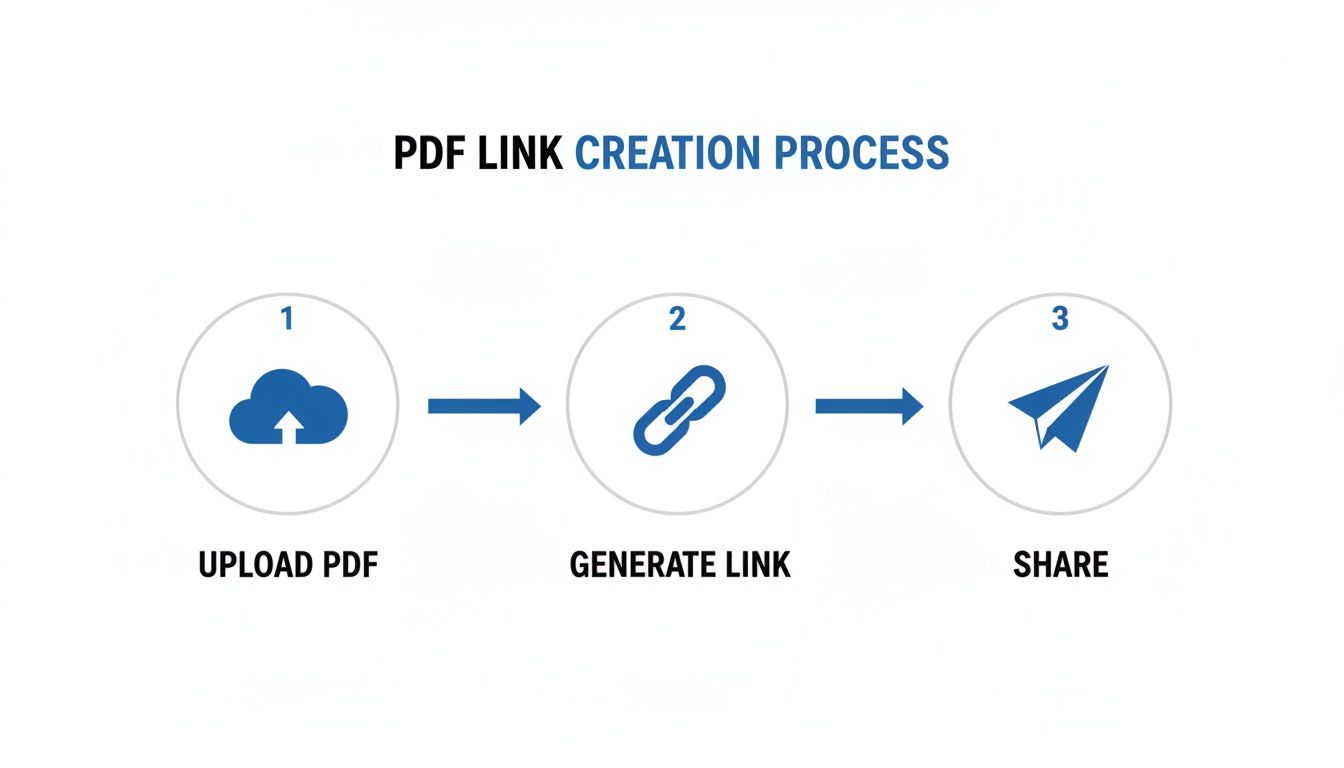
The goal here is to remove friction, turning what used to be a technical chore into a quick, intuitive workflow.
Reinforce Your Brand with a Custom Domain
Let's be honest, consistency is key to building credibility. Do you want to send a link that promotes the platform you're using, or one that promotes you?
Just look at the difference:
- Generic Link:
platform.com/8xJk4zP - Branded Link:
files.youragency.com/spring-catalog
The branded link is instantly recognizable, professional, and trustworthy. Your client knows exactly who the document is from before they even click. Platforms like Hostmora make it simple to connect your own domain or subdomain, immediately elevating how your shared documents are perceived without needing a ton of technical know-how. It's a small tweak with a huge impact on your brand.
Add Essential Password Protection
Some documents just aren't for public eyes. Think about financial reports, client proposals with sensitive pricing, or exclusive content for your subscribers. You need a way to control who gets in, and password protection is the most direct way to do it.
This feature lets you set a unique password for any PDF you upload. Only people you've shared the password with can open the file, adding a crucial layer of security. This is non-negotiable for any business dealing with confidential information. For a more comprehensive security strategy, it's also smart to understand how to protect your entire website with a password.
Expert Insight: For legally binding or highly sensitive documents, security isn't just a feature—it's a requirement. To maintain trust and compliance, especially when dealing with legal paperwork, look into how secure online notarization processes can add another validated layer of security to your shared PDFs.
Connect Physical and Digital with QR Codes
Knowing how to generate a PDF link also unlocks some really creative marketing opportunities. Most modern publishing tools can instantly create a QR code for your link, creating a powerful bridge between your physical marketing materials and your digital content.
Think about the possibilities:
- A restaurant puts a QR code on its front door that links directly to its daily menu PDF.
- A consultant places a QR code on their business card that opens their professional portfolio.
- A retail store adds QR codes to product packaging that link to detailed user guides.
This makes your documents accessible in situations where a clickable link just isn't an option. It provides a smooth, modern experience for your audience and shows that you value their time. It’s a simple, effective way to make your content interactive.
Turn Your PDF Link into a Growth Tool
A simple link to your PDF is functional, but it's not working nearly as hard as it could be. Think of it less as a file delivery system and more as a strategic asset. When you move past just dropping a raw URL into an email, you can turn your documents into powerful tools for engagement, lead generation, and even SEO.
Let’s look at the typical, clunky experience. A visitor is on your website, clicks to view your new case study, and bam—they're abruptly sent to a new browser tab with a generic PDF viewer. The connection to your brand is instantly broken, pulling them away from your website and your key messages.
Keep Visitors on Your Page by Embedding PDFs
There’s a much smarter way to handle this: embed the PDF viewer directly on your website or blog post. This simple change keeps your audience right where you want them—on your page, immersed in your brand, with your calls-to-action right there. It’s a seamless and professional touch that makes a huge difference.
Instead of forcing a download or making someone juggle browser tabs, an embedded viewer lets them flip through your portfolio, browse a catalog, or read a report without ever leaving your site. I've seen this one tweak dramatically improve user engagement metrics and lower bounce rates. It shows you’ve thought about their experience.
Track Engagement and Make Smarter Decisions
Once you’re using a dedicated tool like Hostmora to generate your PDF links, you unlock a feature that basic cloud storage just can't offer: simple, useful analytics. You can finally stop guessing whether a client opened that critical proposal or if anyone is actually reading your latest whitepaper.
With built-in tracking, you get a clear picture of how your documents are performing.
- Total Views: See exactly how many times your document has been accessed.
- Unique Visitors: Know how many different people have viewed your file.
- Geographic Data: Get a general sense of where your audience is coming from.
This isn't about getting lost in complex dashboards. It's about getting quick, actionable feedback. This data helps you follow up with genuinely interested leads and tweak your content based on what people actually find valuable. You can also explore other ways to bridge the physical and digital gap, like learning how to convert a PDF to a QR code.
Make Your Links AI-Friendly
We're in an era where AI tools like ChatGPT and Gemini are constantly used for research and summarizing content. A standard, locked-down link from a cloud drive is usually a dead end for these AI crawlers. They can't access, read, or analyze the information inside.
A properly hosted PDF link, however, is live on the web and fully indexable. This is a game-changer for sharing technical documentation, research papers, or datasets that you want to be easily understood and processed by automated systems.
This accessibility also gives you a serious leg up in link-building. Data shows that long-form content generates 3.5 times more backlinks, and original research can attract 200% more links. By making your detailed reports and studies easily shareable and readable online, you’re making it incredibly simple for others to cite and link back to your work. You can dig into more of these powerful link-building statistics to see the impact.
Common Mistakes and Pro Tips for PDF Sharing
So, you know how to generate a PDF link. That’s the easy part. The real challenge is making sure your shared documents look professional and don't create a headache for your clients. I’ve seen my fair share of mistakes over the years, and these tips will help you sidestep them and share files like you’ve been doing it for decades.
One of the biggest culprits? File size. Nobody wants to wait for a massive, unoptimized PDF to load, especially if they’re on their phone. A quick compression before you upload can slash file size by up to 70% without a noticeable drop in quality. It’s a simple step that guarantees a faster, smoother experience for everyone.
Another classic blunder is sending out those generic, jumbled links. A URL filled with random letters and numbers just looks unprofessional and can even seem suspicious in an email. Taking a minute to use a custom domain instantly turns that messy link into a clean, branded asset that builds trust right away.
Establish Smart Workflow Habits
Building a consistent process from the start is a game-changer. It saves you time in the long run and, more importantly, prevents those cringe-worthy mistakes that make you look unprepared. A solid workflow means every single document you share meets a high standard.
Here are a few habits I swear by:
- Create a Naming Convention: Ditch
Final_v2_final.pdffor good. Use clear, descriptive names likeClientName-Proposal-Nov2024.pdf. It keeps your files organized and tells the recipient exactly what they’re getting before they even click. - Always Double-Check Permissions: Before you hit "send," give your security settings one last look. Are password-protected files accessible with the password you shared? Are your public files actually public? It's a quick check that can save a lot of follow-up emails.
- Use Version Control: This is a big one. When a document needs an update, use a platform like Hostmora that lets you swap out the file behind the same link. This stops outdated versions from floating around and causing chaos.
The most overlooked mistake? Forgetting that a shared link is a living document. I’ve seen people send a link and then delete the file, or just let an old version linger. You have to treat your shared links as active extensions of your brand that need to be managed.
Avoid These Common Traps
Finally, let's talk about the user experience. A lot of people still force their audience to download a file just to view it. Think about it—that's an extra step for them and it clutters up their device. A much better way is to use a tool that provides an in-browser viewer or lets you embed the PDF directly. It’s seamless.
Also, don't just assume your link will work forever. Links break. Services change. Make it a habit to periodically test your most important links, like the portfolio in your email signature, to make sure they're still live and pointing to the right place. These small checks make a huge difference in how professional you appear.
Answering Your Top Questions About PDF Links
Once you get the hang of generating a PDF link, a few practical questions almost always come up. Nailing these details is the difference between sharing a document and sharing it professionally. I've rounded up the most common questions I hear to give you straight, clear answers.
Think of this as the final check-in before you send your work out into the world. These are the real-world things that matter when you move from just knowing how to do something to doing it right.
Can I Update the PDF File Without Changing the Link?
Yes, absolutely—and honestly, this is one of the biggest reasons to use a proper publishing platform. With a tool like Hostmora, you can just upload the new version of your PDF, and the original link automatically points to the updated file.
This is a complete game-changer for documents that are constantly evolving, like:
- Restaurant menus that you update with the seasons
- Price lists or service catalogs with new products
- Portfolios you're always tweaking to show off your latest work
This single feature prevents the nightmare of "link rot," where old links point to outdated information. You'll never have to send another one of those "oops, here's the new link" emails to a client again. The one you sent first always works.
Will My Generated PDF Link Be Indexed by Search Engines?
By default, links you create on a professional platform are live on the web, which means they can be indexed by search engines like Google. This is a huge plus if you want people to find your documents—think public-facing product catalogs or research papers.
But you're not stuck with that. You almost always have control over search engine visibility. Good platforms will have an advanced setting to add a "no-index" tag, which is just a simple instruction telling search engines to skip over it. This is perfect for private client proposals or internal documents you'd rather not have pop up in a public search.
Is There a Limit to the File Size I Can Upload?
File size limits almost always come down to the plan you're on. Free tiers on most platforms will have a smaller cap, which is usually fine for simple, text-heavy documents.
Paid plans, however, are built for professional use and typically offer much larger allowances. This ensures you can upload a high-resolution design portfolio, a detailed financial report, or even a presentation packed with video without hitting a wall. My advice? Always check the specifics of the plan to make sure it can handle the kind of files you work with every day.
How Is This Different from a Dropbox or Google Drive Link?
This is a great question. While cloud storage like Dropbox or Google Drive is fantastic for personal file management and collaborating with your internal team, a dedicated publishing platform is built for sharing with the outside world.
The real difference is in the professional features. A platform like Hostmora gives you tools that storage services just don't offer, like custom domains, password protection, QR code generation, and engagement analytics. It’s about taking a simple file and turning it into a branded, secure, and trackable asset that’s designed to impress clients and customers.
Ready to create secure, professional links that actually work for you? With Hostmora, you can turn any file into a branded, shareable asset in seconds. Start publishing for free today.