

Ever had an email vanish into thin air, only to get a frustrating "undeliverable" bounce-back message? The culprit is often a tiny, overlooked setting in your domain's DNS: the MX record. Think of it as the digital mailing address for your email. If it's wrong, your mail simply won't arrive.
This guide will walk you through how to find and check your MX records, so you can make sure your messages always land in the right inbox.
Why Finding Your MX Record Matters
An MX (Mail Exchange) record tells the internet where to send emails addressed to your domain. When someone sends a message to you@yourdomain.com, their email server does a quick DNS lookup to find the MX record for yourdomain.com. This record points to the exact mail servers—like those for Google Workspace or your Hostmora hosting—that are set up to handle your mail.
If that record is missing or points to the wrong place, sending servers have no delivery instructions. It's like trying to mail a letter to a house with no address. For anyone running a business or a professional brand on a custom domain, getting this right is non-negotiable.
The Real-World Impact of Correct Records
Reliable email is the backbone of professional communication, whether you're a designer sending proofs, a consultant coordinating projects, or a small business confirming orders. A single misconfiguration can bring your entire workflow to a screeching halt.
Knowing how to quickly find your MX record is a crucial troubleshooting skill. It helps you:
- Solve Delivery Problems: Instantly see if your email is pointed to the right servers.
- Confirm New Setups: Make sure a new email service is configured correctly right from the start.
- Avoid Downtime When Switching Providers: Verify that your records have updated properly after migrating your email.
Let's look at a practical example. Online tools like the Google Admin Toolbox provide a clear and immediate picture of a domain's MX setup.
The results from a tool like this will show the mail server's address and its priority level, giving you a definitive answer about where your domain's email is being sent.
Quickest Ways to Find an MX Record
Here are the most common and reliable methods for checking a domain's MX records, suitable for any skill level.
| Method | Best For | What You Get |
|---|---|---|
| Online Tools | Quick, easy checks without any technical commands. | Simple list of mail servers and their priorities. |
| cPanel/Plesk | Users managing their hosting directly. | A visual editor to see and change DNS records. |
| Command Line | Developers and system admins who prefer the terminal. | Raw, detailed output for advanced troubleshooting. |
Ultimately, online lookup tools are the fastest path for most people. They cut straight to the chase and give you the information you need in seconds.
Key Takeaway: An incorrect or missing MX record is the #1 reason custom domain emails fail to arrive. Learning to perform a quick check is a simple skill that prevents major communication breakdowns, safeguarding your professional credibility and ensuring you never miss a critical message. This quick checkup turns a technical headache into a straightforward solution.
Using Online Tools to Find MX Records Instantly
If you'd rather skip the command line entirely, plenty of excellent online DNS lookup tools can get you the information you need in seconds. These websites are built for speed and simplicity. All you have to do is plug in a domain name, and they’ll instantly pull up the MX records in a clean, easy-to-read format.
They cut right to the chase, giving you an immediate answer without any technical fuss.
Some of the most popular and reliable options are MXToolbox and the Google Admin Toolbox. The process is nearly identical for all of them: find the search box, enter the domain you want to check, and hit the button. In just a moment, you'll see a complete list of that domain's mail exchange records.

This method is perfect for a quick sanity check to confirm your email is pointed to the right place. It's especially handy after setting up a new email service or configuring a custom domain with a provider like Hostmora.
How to Read the Results
Once the tool spits back the data, you’ll see a few columns of information. It might look a bit technical at first glance, but it's actually quite simple to interpret what each piece means for your email delivery.
Here's a quick rundown of what you'll find:
- Hostname: This is simply the address of the mail server that handles incoming email. For a Google Workspace account, for example, you'd likely see something like
smtp.google.com. - Priority: This number tells sending servers which mail server to try first. The rule is simple: the lowest number has the highest priority. That’s your primary server.
- TTL (Time to Live): Measured in seconds, this value tells DNS servers across the internet how long they should "remember" this information before they need to check for an update.
So, if you see a record with a priority of 10 pointing to the mail server you just set up, that’s a great sign. It's a quick, visual confirmation that everything is configured as it should be.
Pro Tip: Using an online tool gives you a snapshot of your domain's public DNS information. This is exactly what other mail servers see when they try to deliver an email to you, making it an incredibly accurate way to diagnose delivery problems from an outside perspective.
Finding MX Records Directly from Your Computer
While online tools are super handy, sometimes you just need a direct, unfiltered look at a domain's DNS data. If you're comfortable with a command line or want to check records from a specific network, your own computer has everything you need. This method gives you a raw, immediate answer without any third-party website in the middle.
The goal here isn't to turn you into a network guru. It’s simply to show you another reliable way to find an MX record. This comes in handy for developers, sysadmins, or anyone who just prefers using the terminal for a quick lookup.
Firing Up Your Command Line
Getting to the command line is simple, but what it's called depends on your operating system. The good news is that the tools you need are already built-in, so there’s nothing to install.
- On Windows: Hit the Start Menu, type
cmdorCommand Prompt, and press Enter. - On macOS: Open Finder, navigate to Applications > Utilities, and launch the Terminal app.
- On Linux: The shortcut
Ctrl+Alt+Tusually does the trick, or you can find "Terminal" in your applications menu.
Once that black window is open, you’re ready to go.
The go-to command for this on all three platforms is
nslookup. Think of it as a standard tool for asking the Domain Name System (DNS) for information, like a domain's IP address or, in our case, its mail servers. It's your direct line to the same DNS servers the rest of the internet uses.
After running the command, you'll see a list of the mail servers and their priority numbers, exactly like you would with an online tool. It's fast, private, and gives you definitive results straight from the source.
For a deeper dive into managing your DNS settings and other configurations, feel free to explore our detailed Hostmora documentation.
Deconstructing MX Records: Priority and TTL
When you pull up a domain's MX records, you'll spot more than just a server address. You'll see two key numbers: Priority and TTL. These aren't just technical jargon; they're the instructions that dictate how reliably your email gets delivered and how quickly any changes take effect.
What Priority Tells Your Email
Think of the priority value as a delivery preference. The lowest number is always the first stop—your primary mail server. It's the go-to destination for all incoming mail.
If, for some reason, that primary server is down or unreachable, the system automatically looks for the next lowest priority number. This creates a built-in failover, a backup route to ensure your emails still find a home instead of bouncing back to the sender.
A typical setup might look like this:
- A primary server with a priority of 10.
- A secondary or backup server with a priority of 20.
All mail attempts delivery to the priority 10 server first. Only if that connection fails will it then try the priority 20 server. It’s a simple but effective system for redundancy.
That said, the landscape is shifting. While multiple MX records used to be the gold standard for everyone, some major providers are simplifying things on their end.
For instance, Google Workspace now often provides new accounts with a single
smtp.google.comrecord. They've moved the redundancy and load-balancing in-house, meaning you don’t have to clutter your DNS with five different records like in the old days. It streamlines setup and reduces potential user error. For a deeper dive into current domain trends, this 2023 analysis on circleid.com offers some great insights.
Why You Can't Ignore TTL (Time to Live)
The other number you'll see is TTL, or Time to Live. This value, measured in seconds, is essentially a caching instruction for DNS servers worldwide. It tells them how long they should hold onto your MX record information before they need to check back for an update.
A very common TTL is 3600, which translates to one hour.
Knowing your TTL is absolutely critical when you're planning to switch email hosts. If your TTL is set to 3600 seconds, it can take up to an hour for the change to fully propagate across the internet after you update your records. During this window, you might see some emails landing in your old inbox and some in the new one. This is completely normal—it's called DNS propagation. Being aware of it helps you set realistic expectations and avoid panicking when things don't switch over instantaneously.
Common MX Record Problems and How to Fix Them
Seeing a "No MX Records Found" error can be alarming, but don't panic. It's almost always a simple fix pointing back to your domain's DNS settings, which you'll find at your domain registrar.
The most common culprit? A completely missing record. Without any MX record, mail servers have no idea where to send your email. Another frequent slip-up is a tiny typo in the mail server’s hostname—even a single incorrect character can derail the whole process.
Misconfigurations and Email Delivery
Incorrect priority numbers are another classic source of email chaos. For instance, if your backup mail server somehow ends up with a lower priority number than your primary one, all your mail will head to the wrong place first. The solution is to jump into your DNS zone file and adjust the priority values so the lowest number points to your main server.
This troubleshooting flowchart can give you a great visual guide for walking through the steps to confirm your MX record setup is healthy.
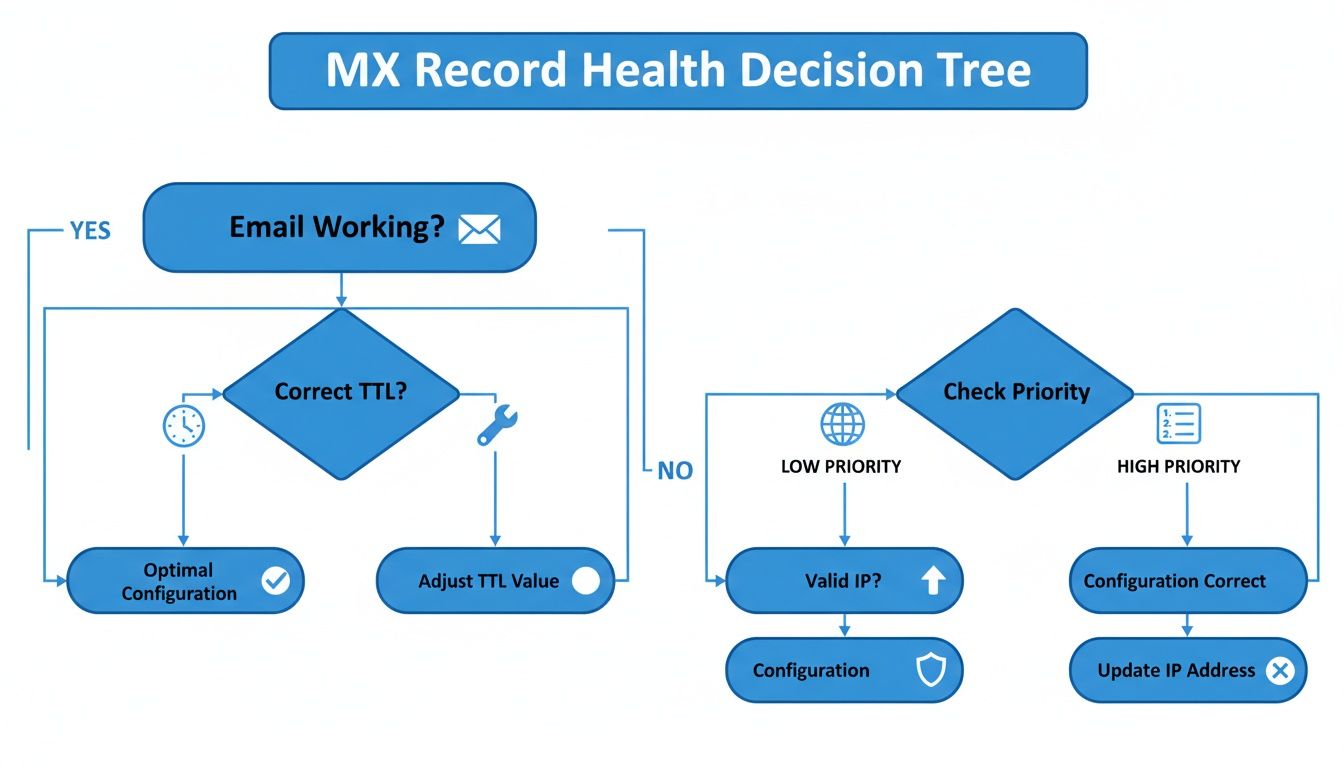
As the chart shows, checking your priority and TTL settings is just as crucial as making sure the record exists in the first place.
These records are a vital piece of the broader email security puzzle. It’s shocking to learn that over 63% of the internet's most popular domains are at risk of email impersonation because of simple DNS misconfigurations. According to a recent email security report from Fortra, 61.9% of domains are missing an SPF record and 81.6% lack a DMARC record—both of which work hand-in-hand with MX records to keep email secure.
Key Takeaway: A missing record, a typo, or mixed-up priority numbers are the top three reasons for email delivery failures. Always double-check these settings in your domain registrar’s DNS panel to get things working again.
For those of us using a platform like Hostmora, making sure your DNS is pointing correctly is critical for keeping both your live website and your professional email running smoothly. Take a moment to review your custom domain settings to ensure everything is in perfect sync.
How MX Records Can Make or Break Your Professional Brand
Think of your MX records as the digital equivalent of a reliable postal service for your business. When they’re set up correctly, everything just works. But when they’re wrong, it’s not just a technical hiccup—it’s a direct hit to your professional image. A bounced email can mean a lost client, a missed deadline, or a critical message that never arrives, shaking the trust you've worked hard to build.
Every single email you send or receive is a touchpoint with your audience. If those emails fail, it looks unprofessional and unreliable. That’s why learning to find an MX record and confirm it's pointing to the right place isn't just for IT pros; it's a fundamental skill for anyone serious about their online presence. It keeps your lines of communication open and dependable.
It's All About Credibility
This isn't a small-scale problem. DNS data reveals a staggering 1.9 billion mail exchange server lookups happen every single day. That number shows just how much the world relies on this system to get emails where they need to go. Every domain, whether it’s for a new business, a personal portfolio, or even a simple QR code menu, needs this to work flawlessly. You can dig deeper into these global domain activity trends on circleid.com to see the full scope.
Taking a few minutes to check your MX records is one of the smartest things you can do for your business. It's a simple act of prevention that ensures messages get delivered, opportunities aren't missed, and your brand's reputation stays solid.
At the end of the day, this knowledge is a powerful asset. For solo entrepreneurs especially, a polished and reliable online presence is non-negotiable for growth. Understanding these settings is one of the many essential skills for a modern freelancer.
Common Questions About MX Records
Once you get the hang of checking MX records, a few common questions always seem to pop up. Let's tackle some of the most frequent ones I hear from people setting up their email for the first time.
How Long Does It Take for MX Record Changes to Go Live?
When you update your MX records, the change isn't instant. While you might see it take effect within a few hours, you should always plan for a propagation window of up to 48 hours.
This delay happens because of something called TTL (Time to Live). It’s basically an instruction telling DNS servers across the internet how long to "remember" your old settings before checking for new ones. So, a little patience is key, especially when you're migrating your email hosting.
Can I Have More Than One MX Record?
Absolutely! In fact, you should. Using multiple MX records is the standard way to build in redundancy and ensure your email keeps flowing even if there's a problem.
You do this by setting a different priority for each record.
The server with the lowest priority number is your main workhorse. If it goes down for any reason, email automatically tries the next server in line. It's a simple but incredibly effective way to prevent lost emails during an outage.
What if My Domain Doesn't Have an MX Record?
If a domain has no MX record, it’s like trying to send a letter to a house with no mailbox. Mail servers on the internet won't have a clue where to deliver the email.
Any message sent to an address at that domain will simply fail to deliver and bounce back to the sender. Bottom line: without at least one valid MX record pointing to a mail server, a domain can't receive any email at all.
Ready to publish your own website in seconds? With Hostmora, you can go from file to live URL with a simple drag-and-drop. Get started for free and see how easy web publishing can be.