

Ever wondered who's behind a .be website? Think of the DNS Belgium WHOIS service as a public directory for the Belgian internet. It’s a lot like a digital land registry—just as a property record shows who owns a piece of land, WHOIS reveals key details about the owner of a specific domain name.
So, What Exactly is DNS Belgium?
Simply put, DNS Belgium is the non-profit organization that manages every single domain name ending in .be, Belgium's official country code top-level domain (ccTLD). Their job is to keep the Belgian corner of the internet running smoothly, securely, and reliably. A huge part of that mission is maintaining an open and accurate database of who has registered which domain.
That’s where the WHOIS system enters the picture. It was originally designed to help network administrators solve technical problems and hold people accountable. Today, it allows anyone to look up the public details tied to a .be domain. This transparency is crucial for a few reasons:
- Verifying Ownership: You can quickly confirm who is behind a particular website.
- Troubleshooting Problems: It helps identify the right technical contacts when things go wrong.
- Fighting Cybercrime: The data provides law enforcement with a starting point for investigations.
The Registry Behind Belgium's Digital Identity
The .be domain has been around since 1988, but it really took off after DNS Belgium took over in 2000 and made registration much easier. This opened the doors for countless businesses, creators, and individuals to establish their online presence. Fast forward to early 2024, and there are now around 1.7 million registered .be domains—a clear sign of its enduring popularity. For a deeper dive into these numbers, you can check out the official .be domain statistics.
The whole idea behind WHOIS is transparency. Making certain registration details public helps build a safer and more accountable online space for everyone who uses a .be domain.
The official DNS Belgium homepage is the central hub for all things related to .be domains, including their lookup tools and services.
The clean, straightforward design reflects their focus on domain management, security, and providing essential resources. Getting a handle on DNS Belgium's role as the central manager is the perfect starting point before we jump into how to actually use their WHOIS service to find the information you need. Their website is always the final authority on the .be domain space.
How GDPR Reshaped WHOIS Privacy for .be Domains
Think back to the internet before 2018. Looking up a domain owner's details was a bit like flipping through a public phone book. A quick WHOIS search would often reveal personal names, email addresses, and phone numbers. Then, the General Data Protection Regulation (GDPR) arrived, and it completely rewrote the rules for digital privacy in Europe.
This regulation wasn't just a minor update; it was a fundamental shift in how organizations are required to handle personal data. For DNS Belgium, the registry for .be domains, this meant a total overhaul of their WHOIS service. They had to figure out how to balance the need for public transparency with the strict legal mandate to protect an individual's privacy. The old, wide-open system was simply no longer an option.
This new approach centers on providing a transparent, yet privacy-first, environment for everyone involved with .be domains.
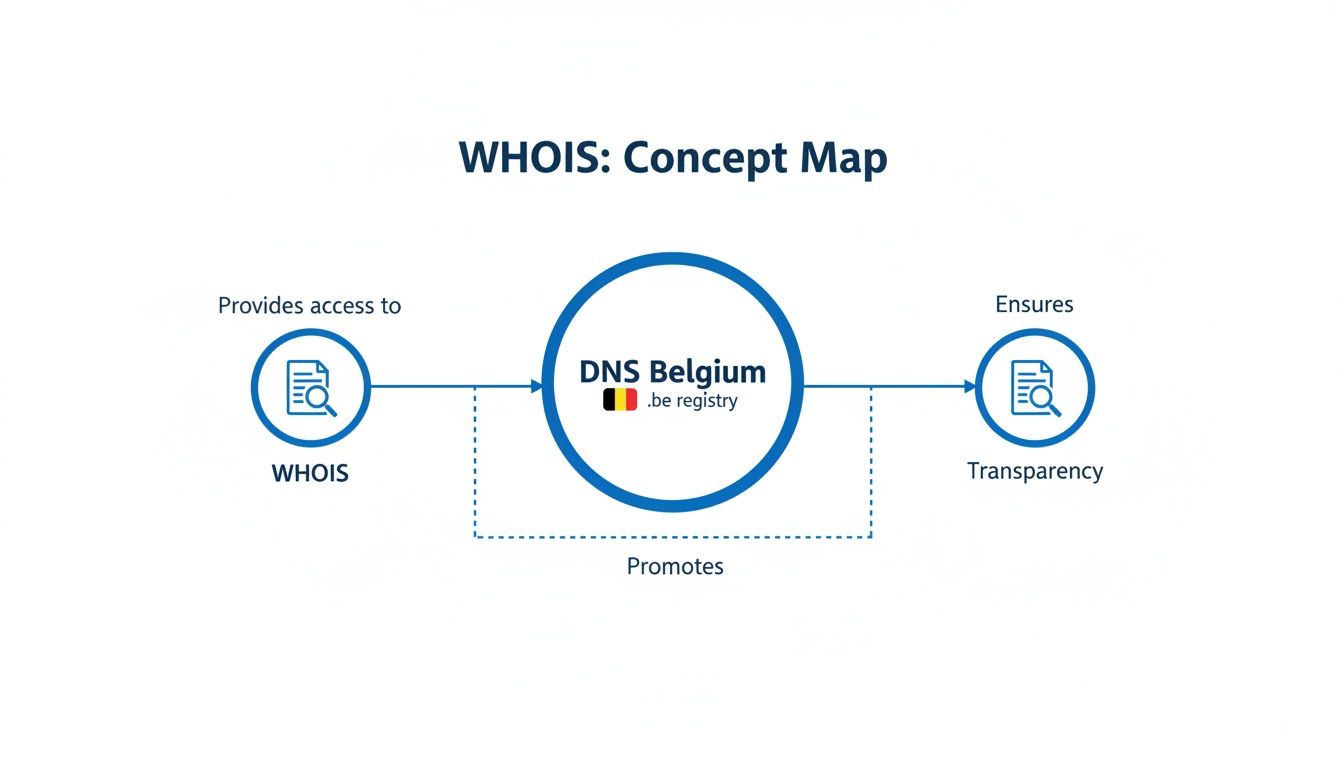
As you can see, DNS Belgium sits at the core, managing the WHOIS system to create a trustworthy and secure digital space.
What Data Is Now Protected?
The most significant change brought by GDPR is the redaction of personal data for individual domain registrants. When you run a dns belgium whois search for a domain owned by a person (not a company), you'll find that sensitive information is no longer displayed publicly.
So what's hidden and what can you still see? This table breaks it down clearly.
Visible vs Protected Data in a .be WHOIS Lookup
| Data Point | Public Visibility for Individuals | Reasoning |
|---|---|---|
| Registrant Name | Protected | This is considered Personally Identifiable Information (PII) under GDPR. |
| Registrant Email | Protected | Masked to prevent spam, phishing, and unwanted contact. |
| Phone Number | Protected | Considered sensitive personal data and is hidden to protect privacy. |
| Mailing Address | Protected | Shielded to prevent physical junk mail and protect personal security. |
| Domain Registrar | Visible | Essential for identifying the company managing the domain registration. |
| Creation/Expiry Dates | Visible | Technical data important for domain lifecycle management and verification. |
| Domain Status | Visible | Shows if the domain is active, expired, or in a redemption period. |
| Nameservers | Visible | Crucial technical information for routing internet traffic to the correct server. |
This tiered approach effectively shields individuals from spammers, data scrapers, and other malicious actors who used to harvest data from public WHOIS records. By implementing these measures, DNS Belgium successfully balances its transparency goals with its legal obligations. You can read more about how registries approach this in this introduction to .be domain and WHOIS privacy.
The Balance Between Privacy and Accountability
While protecting personal data is crucial, total anonymity online can open the door to illegal activities. DNS Belgium navigates this by creating a system that protects data from the public while still allowing for accountability.
DNS Belgium ensures that while personal data is shielded from the general public, a formal process exists for law enforcement, intellectual property lawyers, or other parties with a valid legal basis to request access to registrant details.
This creates a carefully structured balance. It prevents the casual misuse of personal information but makes sure there are official channels to hold domain owners accountable when necessary. This system gives domain owners peace of mind that their details are safe, without turning the internet into a free-for-all. For a broader look at this topic, you can review our thoughts on online privacy and security.
How to Look Up a .be Domain with WHOIS
Alright, now that we've covered the theory behind DNS Belgium's WHOIS system, let's get practical. Actually checking the details for a .be domain is simple, and you have a couple of ways to do it.
For most people, the easiest route is using the search tool right on the DNS Belgium website. It's designed for everyone, no technical background required. But if you're someone who lives in the terminal, there's a command-line option that's much faster. We'll walk through both.
Using the DNS Belgium Web Tool
The most straightforward way to run a dns belgium whois search is through their official online portal. It couldn't be simpler, and the results are laid out clearly.
Here’s how it works:
- Head to the WHOIS Page: Just open your browser and go straight to the DNS Belgium WHOIS search page.
- Enter the Domain: In the search box, type the
.bedomain you're curious about. No need for "www." or "https://". - Pass the Security Check: You'll probably see a quick CAPTCHA. This is just to make sure you're a person and not a script hammering their server.
- See the Results: Hit the search button, and the public registration data will pop up.
The tool itself is clean and uncomplicated, as you can see below.

This simple form is the main entry point for anyone needing to access public domain info quickly and easily.
The Command-Line Method for Technical Users
If you're comfortable on a command line (like Terminal on macOS or any Linux distro), using the whois command is a more direct way to get the same data. It skips the web browser entirely and prints the raw text output right on your screen. This is fantastic for quick checks or if you want to integrate the lookup into a script.
To do it, just open your terminal and type whois followed by the domain name. For example, a command like whois example.be will automatically query the correct server and spit back the results.
The bottom line: The command-line tool is a real time-saver if you're already in a terminal. It provides the exact same public data as the web tool, just in a different, more raw format.
Keep in mind, a WHOIS lookup gives you registration details, which is different from the technical data stored in DNS records. If you're trying to debug a website or email problem, you'll probably need to learn how to show DNS records for a domain to see the full picture.
What to Expect from Your Search Results
Whether you use the website or the command line, the information you get back will be largely the same. As we talked about earlier, GDPR means personal data for individual domain owners is kept private. Still, you’ll find plenty of useful technical and administrative details.
Here’s a quick rundown of what you’ll typically see:
- Domain Status: This tells you if the domain is currently active, has expired, or is in some other state (like quarantine).
- Registrar Information: You'll see which company manages the domain's registration (e.g., GoDaddy, Combell).
- Creation and Expiration Dates: These show you exactly when the domain was first registered and when it's due for renewal.
- Nameservers: This is key technical info. It lists the servers responsible for directing traffic for that domain.
This data is incredibly useful for all sorts of things, like confirming a domain's legitimacy, figuring out which registrar to contact, or just checking when a domain you want might become available.
How to Interpret Your WHOIS Results
Running a dns belgium whois search is the easy part. The real skill is knowing how to read the block of text that comes back. Think of it like a domain's official ID card—it won't spill any personal secrets, but it gives you the vital statistics on its health, history, and who’s managing it.
Every line of that report has a purpose. Whether you're trying to fix a technical problem, check out a competitor's online footprint, or even scope out a domain you'd like to own, this data is your starting point.
Let's break down what those fields actually mean.
Decoding the Core Data Fields
When your WHOIS report pops up, a few key fields give you the most important information right away. If you focus on these first, you'll get a solid snapshot of the domain's current situation.
Here's what to look for:
- Registrar: This is simply the company where the domain was registered, like Combell, GoDaddy, or OVH. If you ever need to report a problem or have a technical question, the registrar is your first point of contact.
- Creation Date: This timestamp shows the exact day the domain name was born. An older date can often suggest a more established website or business.
- Expiration Date: Mark this one on your calendar. It's the date the current registration runs out. If you're hoping to snag a particular domain, this tells you when it might become available if the owner doesn't renew.
- Last Updated Date: This field tells you the last time someone changed any information in the domain's record. A recent update could signal a change in ownership, contact details, or DNS settings.
It also helps to understand that different registrars have their own processes. For example, learning the specifics of managing a domain name with a major registrar like OVH can give you a better sense of how these companies handle registration data behind the scenes.
Understanding Domain Status Codes
Now for the most critical piece of the puzzle: the Domain Status. This isn't just a simple "active" or "inactive" tag. It's a specific, standardized code that reveals exactly what's going on with the domain on a technical level.
These are officially called Extensible Provisioning Protocol (EPP) status codes, and they're used across the entire domain industry. They provide a clear, universal signal about a domain's state and any restrictions currently in place.
For a .be domain, you'll commonly run into a few of these codes. Here’s a quick guide to what they mean:
| Domain Status Code | What It Means for You |
|---|---|
OK or Active |
All good. The domain is working perfectly and can be renewed. This is the normal, healthy status. |
clientTransferProhibited |
This is a safety lock. The registrar has blocked the domain from being transferred to prevent hijacking. |
pendingDelete |
The domain wasn't renewed, has passed all grace periods, and is now in its final days before being erased and made available to the public. |
redemptionPeriod |
The domain has expired, but the original owner has one last chance (usually 30 days) to get it back, typically for a higher fee. |
Once you learn to read these codes, you can instantly see what's happening. A domain in redemptionPeriod isn't available quite yet, but it’s a strong signal that it's worth watching closely.
Dealing with Common WHOIS Scenarios
Running a dns belgium whois lookup is one thing, but knowing how to interpret the results—especially when they're not what you expected—is a whole different ballgame. You're bound to run into situations where data seems to be missing or you need to act on what you’ve found.
These aren't just hypotheticals. You might pull up a record and find the owner's information is completely hidden, leaving you stuck. Or maybe you'll check your own domain and realize the contact details are years out of date, putting your registration in jeopardy.
What To Do When Owner Data Is Private
So, you've run a search, and your first thought is probably, "Where's the owner's name and email?" Thanks to GDPR, the personal details of individual .be domain registrants are kept private. This isn't a glitch; it's a deliberate and essential feature of the modern WHOIS system.
But what if you have a perfectly good reason to get in touch, like a trademark dispute or an urgent technical problem? You can't just grab their email, but you're not out of options. DNS Belgium has a clear, legal process for making contact.
- For legal issues: If you're dealing with trademark infringement or another legal matter, you can submit official requests through the proper channels to either DNS Belgium or the domain's registrar.
- For technical problems: If a domain is causing trouble (say, sending spam that appears to come from your server), your best first step is to contact the domain's registrar. Their name is always public in the WHOIS record.
This approach strikes a smart balance between protecting privacy and ensuring accountability. It shields individuals from spam and harassment while providing a formal path for necessary communication.
How to Contact a Domain Owner the Right Way
If you have a legitimate need to reach a domain owner, DNS Belgium offers a way to do it without revealing their personal data. Their procedures are designed to handle different types of requests and filter out everything but genuine inquiries.
Belgium was one of the first EU countries to implement the NIS2 Directive into its national law, which means there’s a very structured process in place. Belgian authorities, like the police, judiciary, and cybersecurity agencies, can request personal data when they have a lawful reason. This strong framework ensures that privacy is the default, but there are clear avenues for holding people accountable.
For most people, the simplest path is to go through the domain's registrar. The registrar can act as an intermediary, forwarding your message to the domain owner if they believe your request is valid.
Correcting Your Own Domain Information
Finally, let's talk about what to do when you run a WHOIS search on your own .be domain and spot a mistake. Maybe you've moved, or the contact email is an old one you never check. This isn't just a small detail—it's a genuine security risk.
It's important to know you cannot update your WHOIS information directly with DNS Belgium. Any and all changes have to be made through the company where you bought the domain in the first place: your registrar.
- Log into your account on your registrar’s website.
- Head over to the domain management panel or a section often labeled "My Domains."
- Find the
.bedomain you want to update. - Look for the option to edit the contact information (this might be broken down into registrant, admin, and technical contacts).
- Save your changes.
Keeping this information up-to-date is absolutely vital. It’s how you receive renewal reminders and other critical notices, ensuring you never lose control of your domain.
Common Questions About the DNS Belgium WHOIS Service
Even after walking through the process, you might still have a few questions about how all of this works in the real world. Let's tackle some of the most common ones we hear about .be domain lookups.
Why Can't I See the Owner’s Details for a .be Domain?
If you've run a DNS Belgium WHOIS search and noticed that the owner's personal information is missing, that's by design. Thanks to strict privacy regulations like GDPR, DNS Belgium has a legal obligation to protect the personal data of individual registrants.
Their name, address, email, and phone number are kept out of the public database. This is a crucial step to shield them from spam and safeguard their privacy.
You'll still find the important stuff, like who the domain registrar is and the technical contact details. If you have a legitimate reason to get in touch with the domain owner—for a legal or technical issue, for instance—you'll need to go through the official channels provided by DNS Belgium or the domain's registrar.
What’s the Difference Between WHOIS and RDAP?
Think of WHOIS as the classic, original protocol for looking up domain registration data. It’s a simple, text-based system that’s been the go-to standard for decades. But as the internet grew up, it needed a more modern and capable replacement.
That’s where RDAP (Registration Data Access Protocol) comes in. It’s the successor to WHOIS, designed for the modern web. It's more secure, structured, and delivers data in a standardized format like JSON, which is a lifesaver for developers and applications that need to process that information.
DNS Belgium, along with the rest of the internet community, is gradually shifting towards RDAP. It simply offers better security, supports international character sets, and allows for more granular control over who can see what data. While WHOIS is still around and widely used, RDAP is definitely the future.
How Do I Update My Own .be Domain Information?
Here's something important to know: you can't change your WHOIS details directly with DNS Belgium. Instead, all updates have to go through your domain registrar—the company you originally bought your .be domain from. This keeps everything secure and ensures changes are handled by the provider you have a direct business relationship with.
The process is usually straightforward:
- Log in to your account on your registrar’s website.
- Head over to the domain management section.
- Find the specific
.bedomain you need to update. - Look for the option to edit contact information (often labeled registrant, admin, or technical contact).
- Update the details with the correct information and save your changes.
Keeping this info current is more than just good housekeeping. It’s essential for getting renewal reminders and other official notices, which can prevent you from accidentally losing your domain.
Can I Register a .be Domain if I Don’t Live in Belgium?
Yes, you absolutely can! DNS Belgium has a very open registration policy, which means there are no residency or local presence requirements to register a .be domain name. It doesn't matter where in the world you are; you can register a .be domain.
This open-door policy makes the .be extension incredibly versatile. It's a great choice for Belgian businesses and individuals, of course, but it's also popular with international companies looking to reach the European market. And let's not forget the creative "domain hacks" that use .be to create a memorable brand name (think youtu.be).
Ready to turn your files into a live website in seconds? With Hostmora, you can drag and drop your content and publish it on a custom domain with a secure, global network. No code, no complexity—just instant publishing. Launch your next project for free at https://hostmora.com.